
What Are HIPAA Workforce Security Requirements?
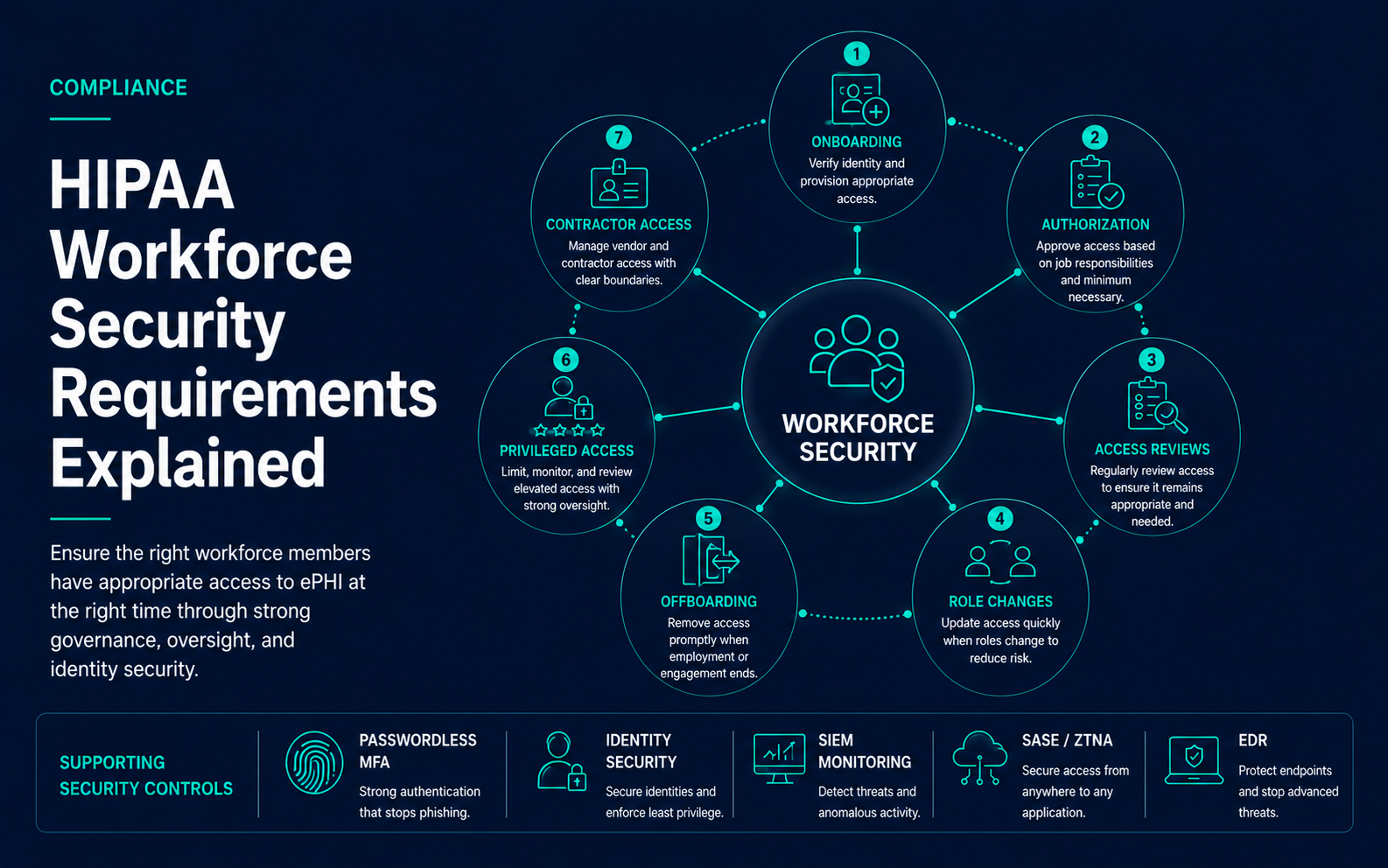
HIPAA Workforce Security requirements are part of the HIPAA Security Rule’s Administrative Safeguards. They focus on ensuring that workforce members who need access to electronic protected health information, commonly referred to as ePHI, are authorized appropriately, supervised where needed, and removed from access when their role changes or their relationship with the organization ends.
In practical terms, workforce security connects human resources, management, IT, security, compliance, and operations. It covers onboarding, role-based access, authorization, supervision, role changes, terminations, contractor access, privileged users, remote workers, and access review evidence.
For healthcare leaders, workforce security is one of the most important operational safeguards because many security incidents begin with access that is excessive, stale, shared, poorly monitored, or not removed promptly.
Key Takeaways
- HIPAA workforce security is about ensuring the right workforce members have appropriate access to ePHI at the right time.
- Workforce security should cover authorization, supervision, role changes, termination procedures, contractors, vendors, and privileged users.
- Access should be tied to job responsibilities, minimum necessary expectations, and documented approval workflows.
- Offboarding and role-change controls are critical because stale or excessive access can create breach and compliance risk.
- Identity security, access reviews, passwordless MFA, SIEM monitoring, SASE, ZTNA, and EDR can all support workforce security readiness.
Why Workforce Security Matters in Healthcare
Healthcare organizations rely on a broad workforce: clinicians, billing teams, front desk staff, administrators, IT personnel, executives, contractors, temporary workers, interns, consultants, and vendor-supported users. Many of these users need access to systems that create, receive, maintain, transmit, or support ePHI.
Workforce security matters because healthcare access changes constantly. Employees are hired, transferred, promoted, terminated, reassigned, placed on leave, granted temporary access, or given emergency access. If access governance does not keep pace, users may retain permissions they no longer need.
A practical workforce security program helps answer:
- Who is authorized to access systems containing ePHI?
- Who approved that access?
- Does access match the user’s current role?
- Are managers responsible for role changes and termination notifications?
- Are contractors and temporary workers included in access governance?
- Are privileged users monitored and reviewed more closely?
- How quickly can access be removed when someone leaves?
- Can the organization produce evidence of access approvals, reviews, and removals?
Core Workforce Security Implementation Areas
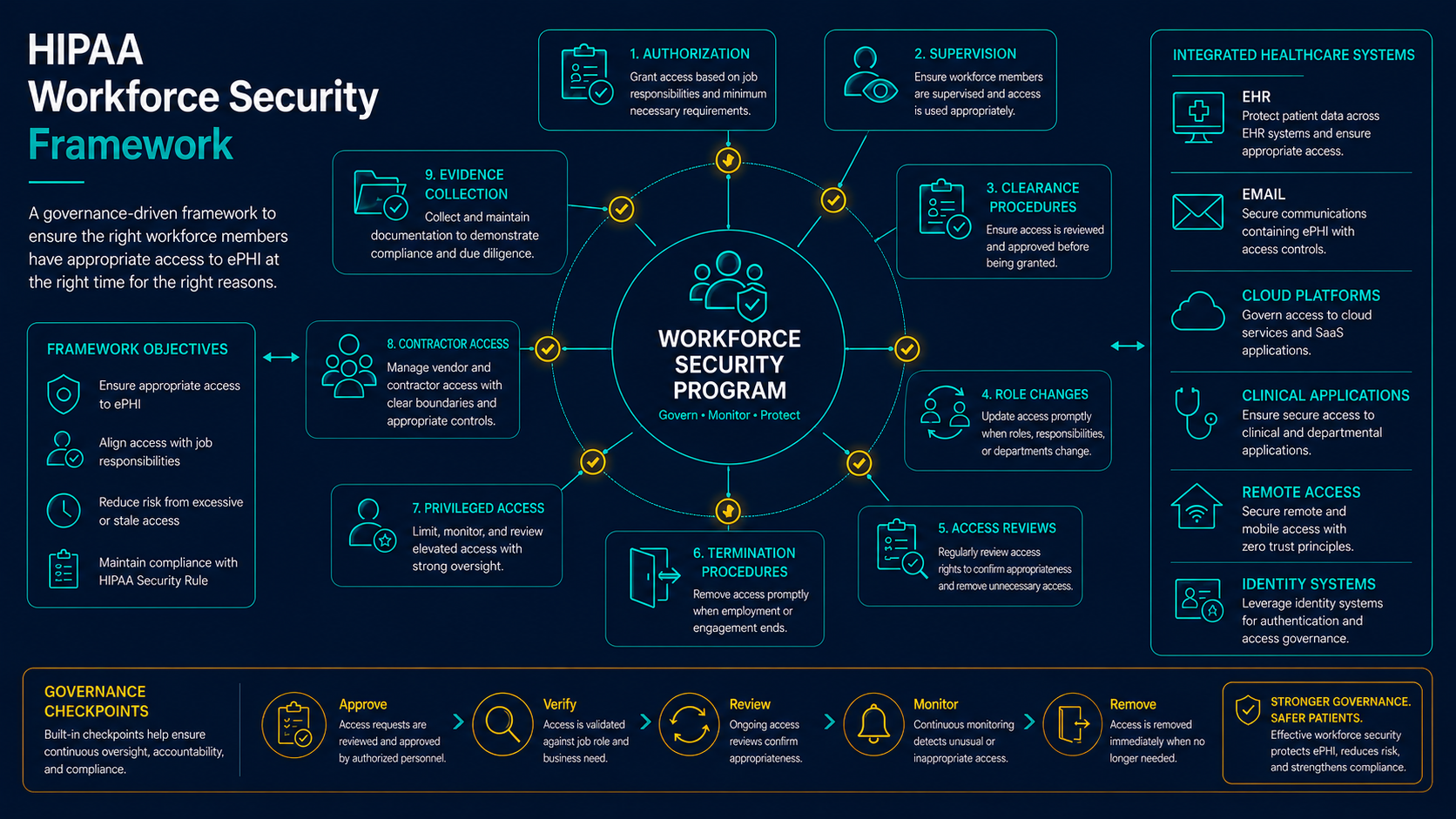
The HIPAA Workforce Security standard includes implementation specifications for authorization and supervision, workforce clearance procedures, and termination procedures. In real healthcare operations, these areas should be translated into access lifecycle processes that are documented, repeatable, and connected to identity systems.
| Workforce Security Area | Operational Purpose | Example Evidence |
|---|---|---|
| Authorization and Supervision | Ensure workforce members are authorized and overseen when accessing ePHI systems | Access approval tickets, manager approvals, role assignments, supervision procedures |
| Workforce Clearance Procedures | Determine whether access is appropriate before it is granted or modified | Job role mapping, access request workflow, background or clearance records where applicable |
| Termination Procedures | Remove access when employment, contract, or role-based need ends | Termination checklist, disabled account evidence, device return record, access removal ticket |
| Role Change Management | Update access when users change responsibilities, departments, locations, or workflows | Role change notification, modified access record, removed permissions, manager attestation |
| Access Review and Monitoring | Validate access remains appropriate and detect suspicious workforce activity | Access review reports, SIEM alerts, EHR audit logs, privileged access review evidence |
Authorization and Supervision
Authorization and supervision require healthcare organizations to make sure workforce members have appropriate access and that access is overseen. This does not mean every user action must be manually supervised. It means the organization should define who is allowed to access ePHI, under what conditions, and how access is approved, monitored, and corrected.
A practical authorization process should include manager approval, role-based access templates, documented exceptions, identity verification, training completion where required, and review of access after it is granted.
- Define which roles require access to each ePHI system.
- Require approval before granting access to sensitive systems.
- Use role-based access where possible to reduce one-off permissions.
- Document exceptions and temporary access approvals.
- Review access for workforce members with elevated risk or unusual access patterns.
- Monitor access activity for suspicious or unauthorized behavior.
Compliance Principle
Workforce access should be intentional, approved, and reviewable. If access is granted informally or inherited without evidence, the organization may struggle to prove that access to ePHI is appropriate.
Workforce Clearance Procedures
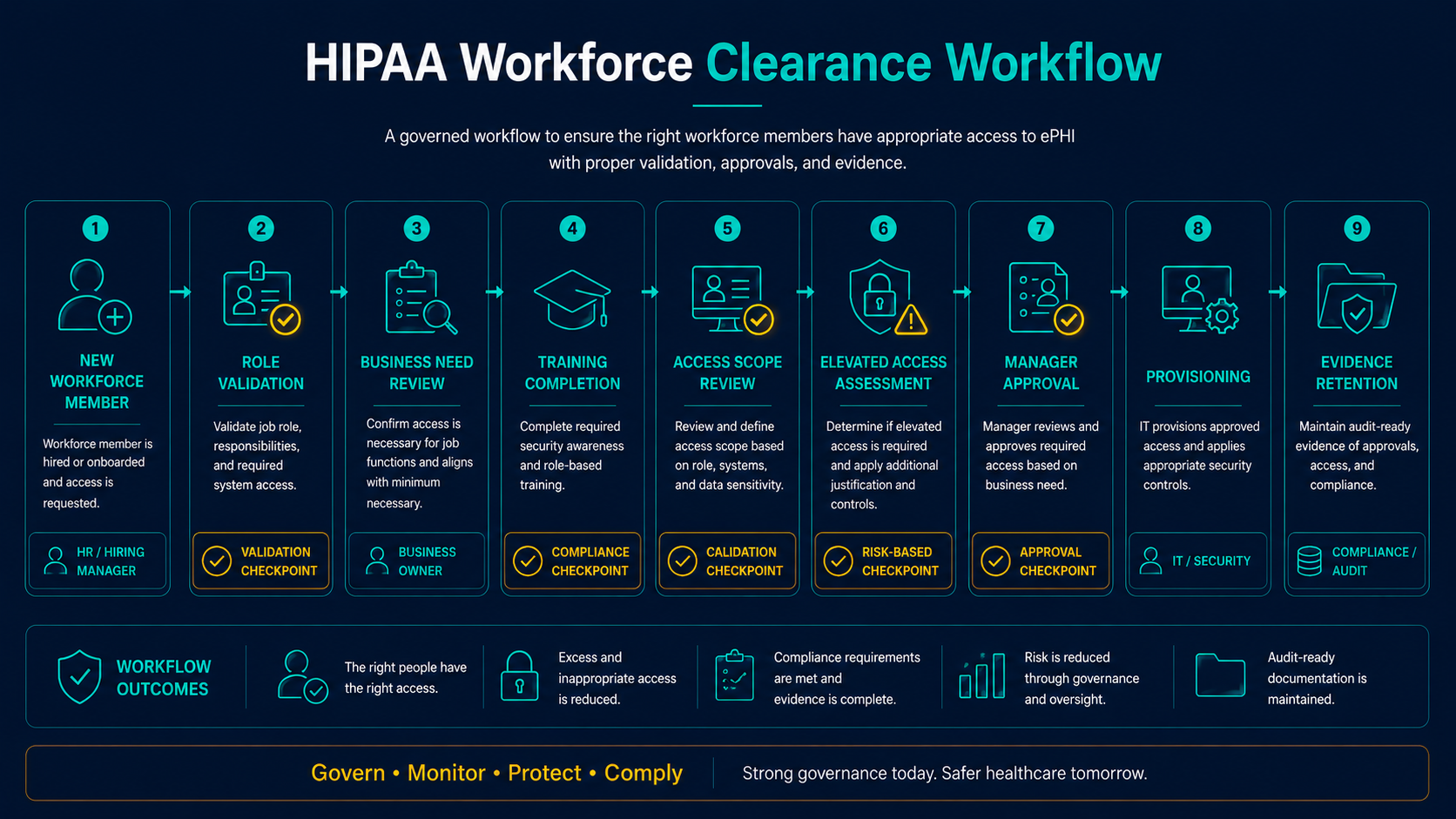
Workforce clearance procedures help determine whether a workforce member’s access is appropriate before access is granted. In healthcare, clearance should be based on job responsibilities, department, location, clinical or business workflow, minimum necessary expectations, and risk level.
Clearance procedures are especially important for roles that involve broad access to patient records, billing data, administrative systems, remote access, backup systems, security tools, or privileged administration.
| Clearance Step | Why It Matters | Evidence to Maintain |
|---|---|---|
| Role Validation | Confirms the workforce member needs access for a defined job responsibility | Job title, department, role mapping, manager approval |
| System Access Scope | Limits access to systems and data needed for the role | Access request, application role assignment, permission set |
| Training Completion | Ensures users understand security and privacy expectations before access begins | Training completion record, policy acknowledgement, onboarding checklist |
| Elevated Access Review | Adds stronger review for privileged, remote, vendor, or high-risk access | Privileged access approval, MFA evidence, access review notes |
| Documented Approval | Creates evidence that access was authorized before provisioning | Ticket record, manager approval, compliance review where required |
Onboarding and Account Provisioning
Workforce security begins before the user receives access. Onboarding should connect HR records, manager approvals, identity creation, role assignment, training, MFA or passwordless enrollment, device assignment, and security awareness requirements.
Account provisioning should not rely on informal emails or tribal knowledge. Healthcare organizations should use a documented process that defines what access is granted, who approves it, which systems are involved, and what evidence is retained.
- Create unique user accounts for workforce members.
- Assign access based on role and department.
- Require security awareness training before access to ePHI systems where appropriate.
- Enroll users in MFA, passwordless authentication, or phishing-resistant authentication where applicable.
- Document device assignment, remote access approval, and application access.
- Validate that access matches the approved role before onboarding is closed.
Role Changes and Access Modification
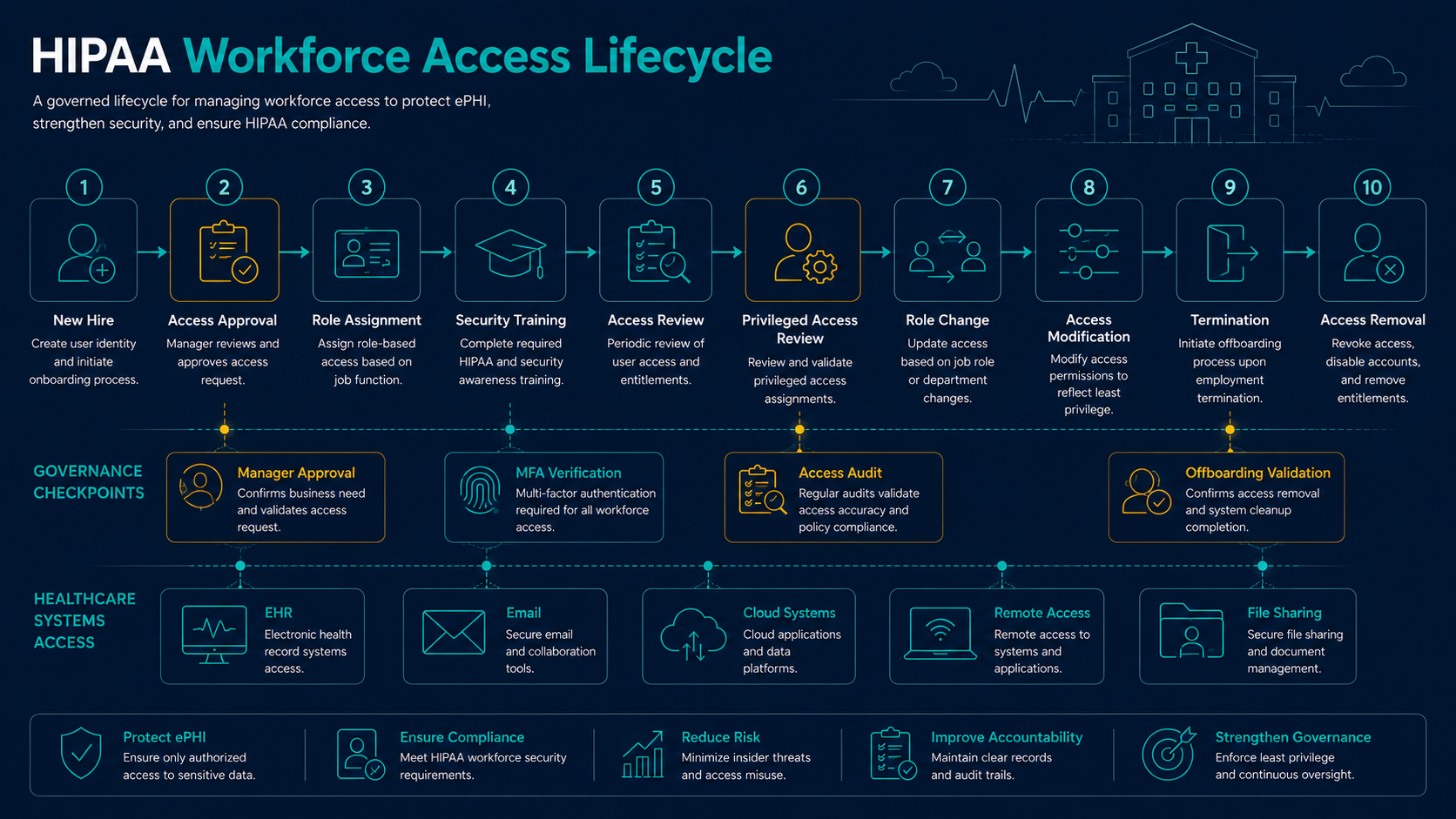
Role changes are one of the most common sources of workforce security risk. A user may move from one department to another, change locations, receive temporary responsibilities, take on management duties, or no longer need access to systems from a prior role.
If access is only added and never removed, privilege creep occurs. Over time, users may accumulate access to systems, records, or administrative functions that no longer match their responsibilities.
Access Governance Reminder
Role changes should trigger both access provisioning and access removal. Adding new access without removing old access increases the likelihood of excessive permissions and unauthorized ePHI exposure.
Termination and Offboarding Procedures
Termination procedures are a critical workforce security requirement. When a workforce member leaves the organization, access should be removed promptly across systems that contain or support ePHI. This includes EHR systems, email, cloud platforms, file shares, remote access, security tools, backup systems, mobile devices, and vendor portals.
Offboarding should be coordinated between HR, management, IT, security, compliance, and vendors where needed. The organization should retain evidence showing that access was disabled or removed.
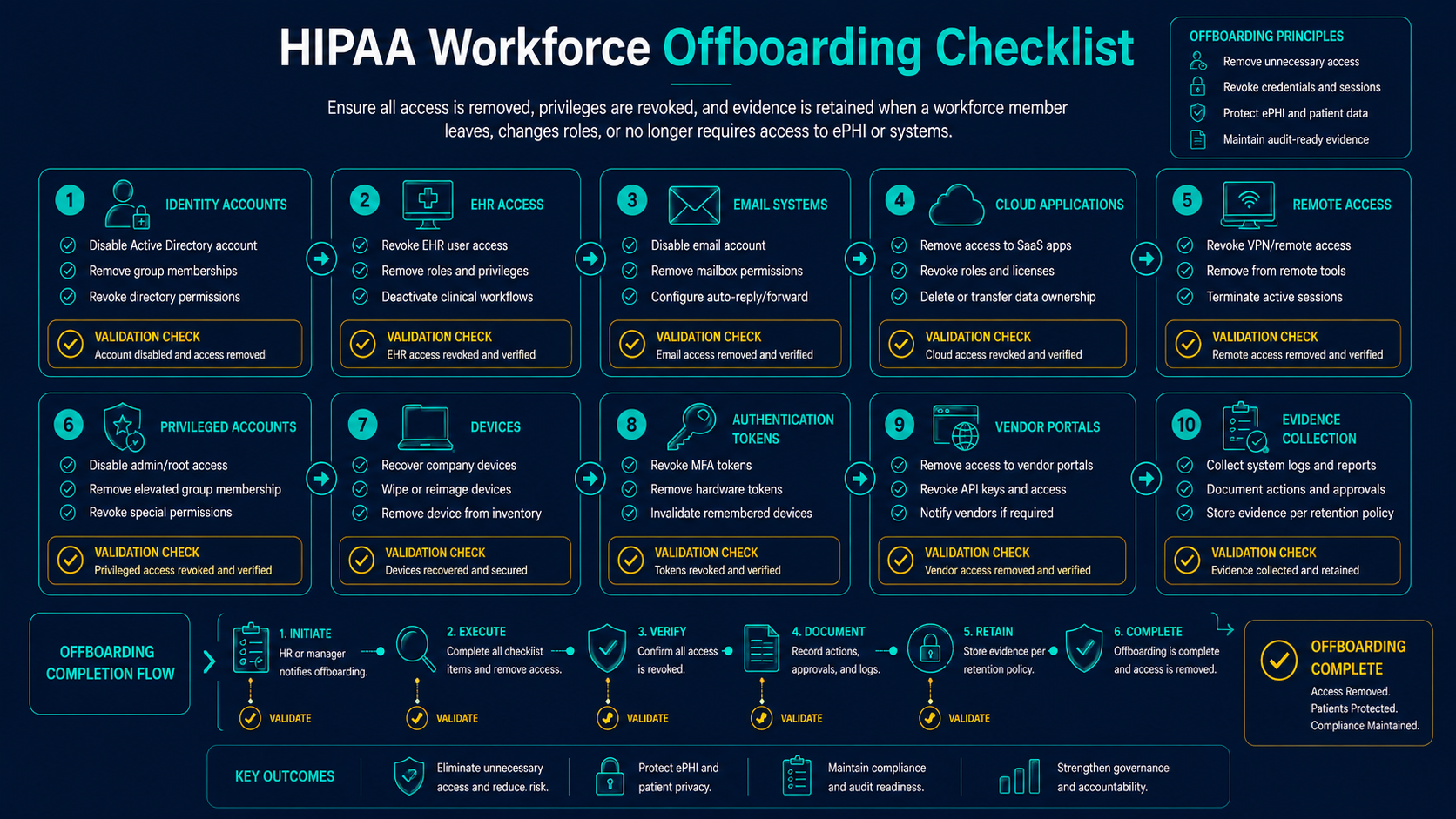
| Offboarding Area | Risk If Missed | Evidence to Maintain |
|---|---|---|
| Identity Provider Account | Former users may retain access to cloud systems or SSO-connected applications | Disabled account record, termination ticket, account status export |
| EHR and Clinical Systems | Former users may retain access to patient records or clinical workflows | EHR user status, access removal record, audit review |
| Email and Collaboration | Mailbox access may expose patient data, attachments, or business communications | Mailbox disable record, forwarding review, delegated access review |
| Remote Access | Former users may retain external access paths into healthcare systems | VPN, SASE, ZTNA, or remote desktop access removal evidence |
| Devices and Tokens | Lost equipment or active authentication tokens may remain usable | Device return record, session revocation, key or token recovery record |
Contractors, Temporary Staff, and Vendor-Supported Users
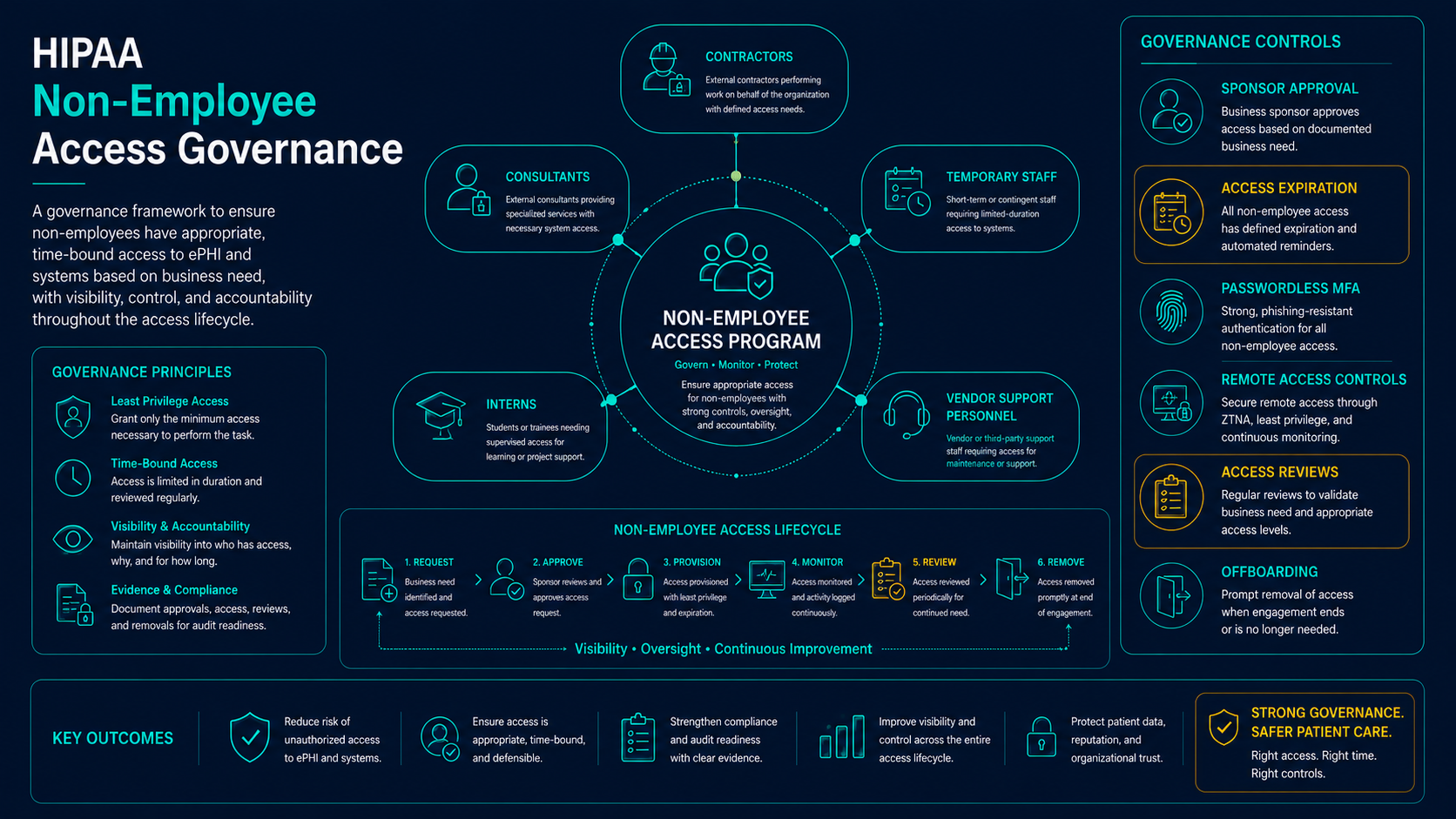
Workforce security should include more than full-time employees. Contractors, temporary workers, interns, consultants, and vendor-supported users may require access to ePHI systems or supporting infrastructure. These relationships can create risk when access ownership is unclear or when account removal depends on manual communication.
Healthcare organizations should define start dates, end dates, sponsoring managers, access scope, authentication requirements, device expectations, and offboarding procedures for non-employee users.
- Assign a business owner or sponsor for each non-employee user.
- Use named accounts rather than shared credentials where possible.
- Set expected end dates for temporary access.
- Require MFA or passwordless authentication for remote and high-risk access.
- Review contractor and vendor accounts more frequently.
- Confirm removal when contracts, projects, or support arrangements end.
Privileged Workforce Access
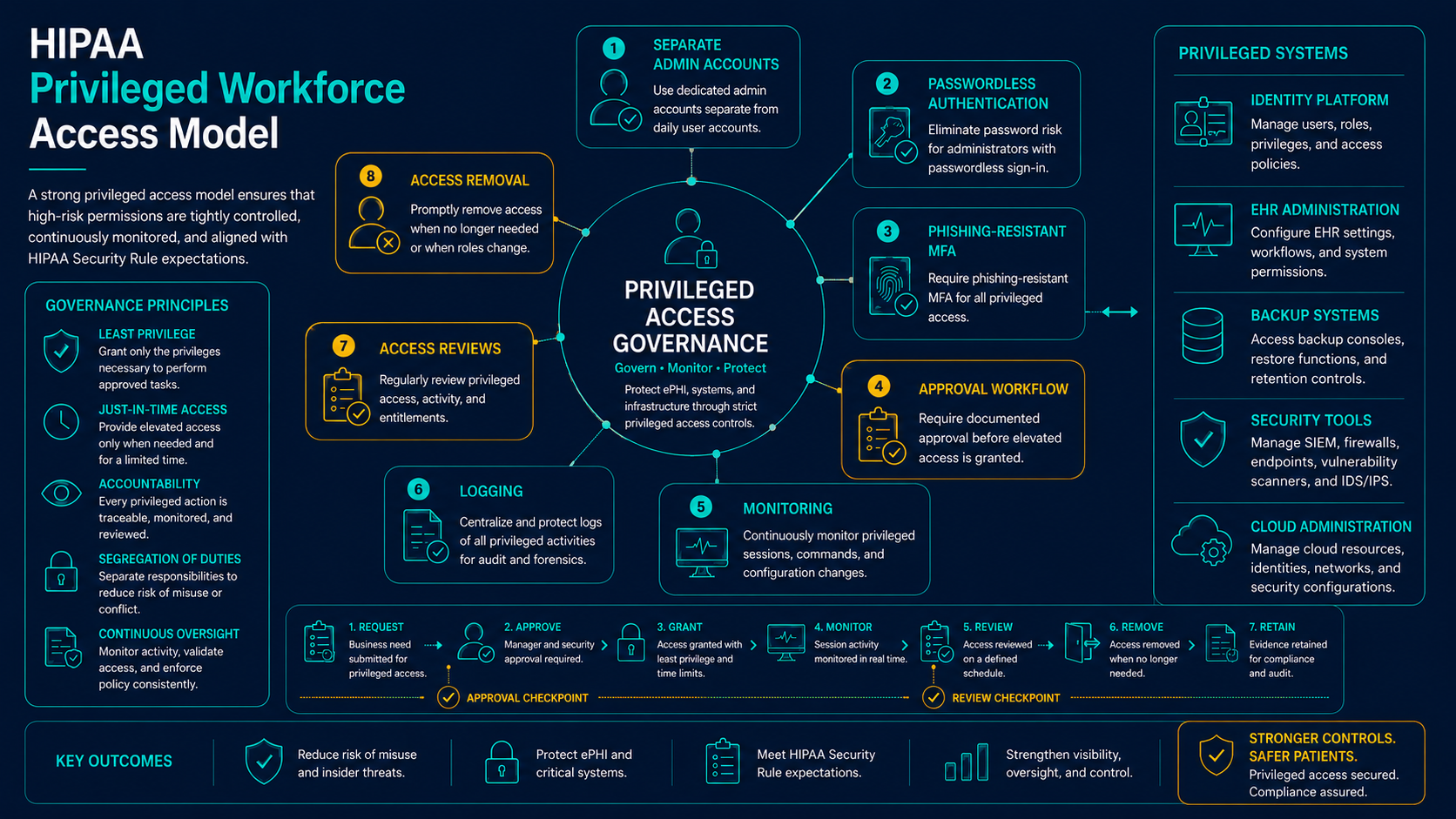
Privileged workforce users require special attention because they can change systems, permissions, logs, backup settings, security policies, and administrative configurations. A compromised or misused privileged account can affect many systems and large volumes of ePHI.
Privileged access should be limited, approved, strongly authenticated, monitored, reviewed, and removed when no longer required.
- Separate administrative accounts from standard user accounts.
- Require strong MFA, passwordless authentication, or phishing-resistant authentication for privileged access.
- Review privileged users on a recurring basis.
- Monitor administrative actions and configuration changes.
- Limit backup, identity, EHR administration, and security tool access to approved users.
- Document approvals, exceptions, and access removal.
Workforce Access Monitoring and Evidence
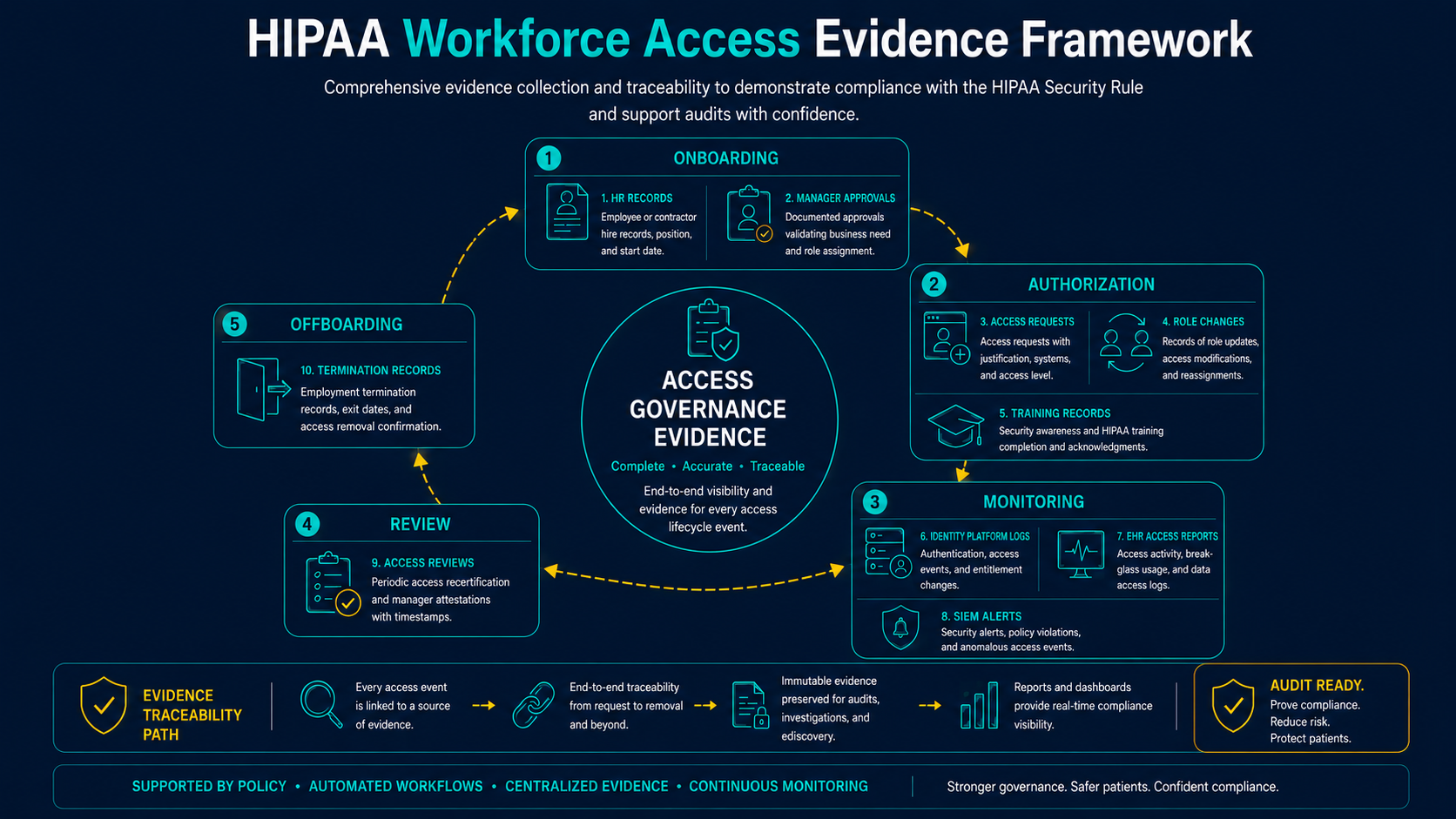
Workforce security depends on evidence. Healthcare organizations should be able to show how access was approved, when it was modified, whether it was reviewed, and when it was removed. Logs and monitoring also help detect suspicious or inappropriate workforce activity.
Useful evidence may include:
- Access request and approval records
- HR onboarding and termination notifications
- Training completion and policy acknowledgements
- Identity provider account records
- EHR user access reports
- Privileged account inventories
- Remote access logs
- SIEM alerts and investigation records
- Role change and access modification records
- Offboarding checklists and disabled account evidence
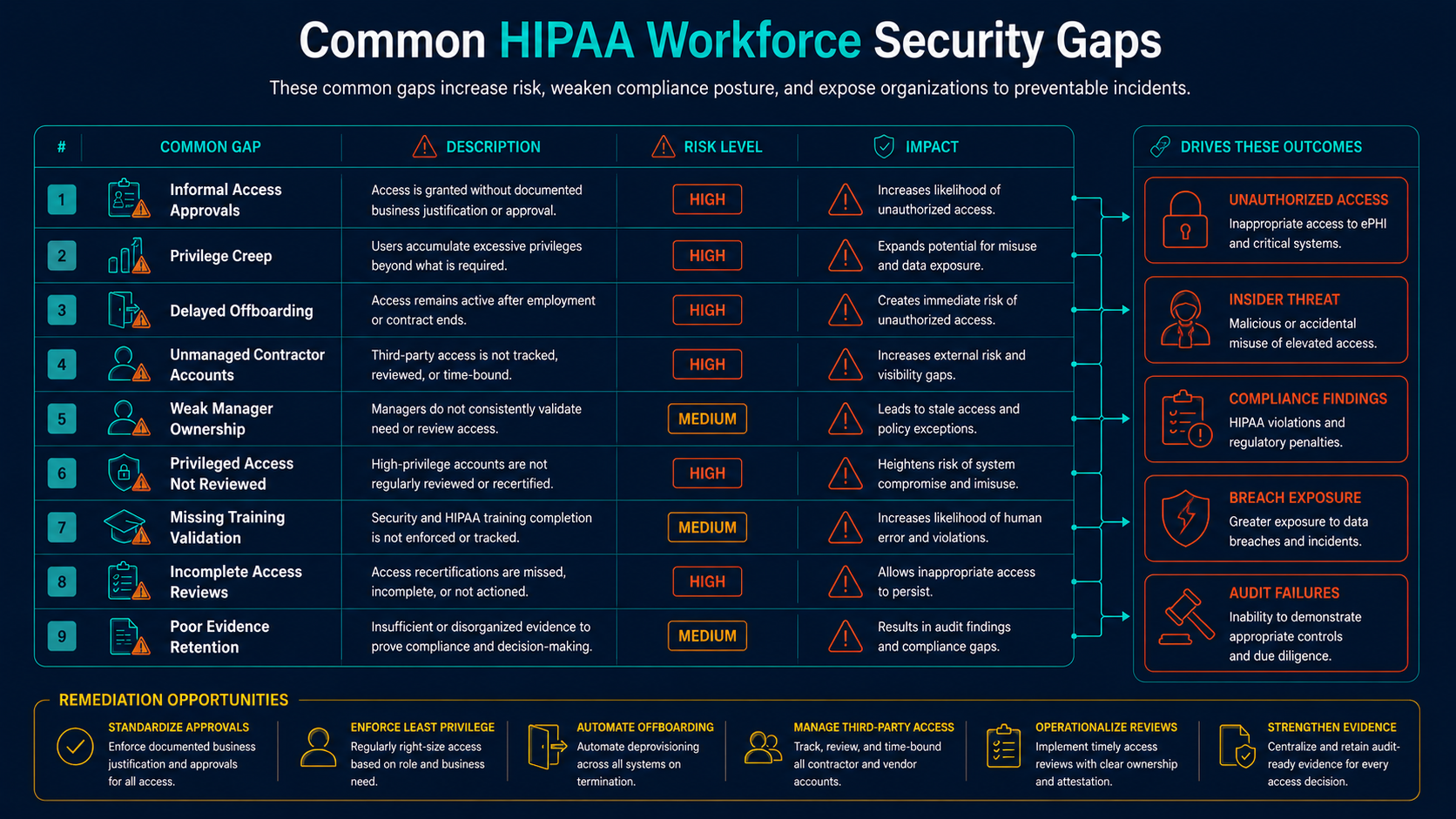
Common HIPAA Workforce Security Gaps
Workforce security gaps often appear during incidents, audits, role changes, terminations, and access reviews. Many gaps are caused by disconnected HR, IT, security, and management processes.
- Informal access approval: Access is granted through emails or verbal requests without retained evidence.
- Privilege creep: Users retain permissions from prior roles or temporary assignments.
- Delayed offboarding: Accounts remain active after termination or contract completion.
- Contractor access is unmanaged: Temporary users remain active after projects end.
- Manager responsibilities are unclear: Role changes and termination notifications are not communicated quickly.
- Privileged access is not reviewed: Administrative access is excessive, stale, or not monitored.
- Training is disconnected from access: Users receive access before completing required security awareness or policy acknowledgement.
- Access reviews lack evidence: Reviews occur informally but are not documented.
- Offboarding does not include all systems: Email or identity accounts are disabled, but EHR, cloud, remote access, or vendor portals are missed.
How Managed Services Support Workforce Security
Managed IT and managed security services can help healthcare organizations operationalize workforce security by improving account lifecycle processes, authentication, monitoring, access reviews, offboarding, and evidence collection.
| Workforce Security Need | Supporting DBT Capability | Compliance-Ready Output |
|---|---|---|
| Account Lifecycle Management | Onboarding support, role-change access review, offboarding checklists, identity administration | Provisioning records, disabled account evidence, access modification reports |
| Authentication Security | MFA, passwordless authentication, phishing-resistant authentication, conditional access support | Authentication policy evidence, MFA coverage reports, exception records |
| Privileged Access Review | Administrative account inventory, access review, identity monitoring, security reporting | Privileged access reports, approval records, remediation tickets |
| Access Monitoring | Managed SIEM, MXDR, identity monitoring, EDR, SASE and ZTNA log visibility | Alert records, investigation timelines, escalation tickets, executive reports |
| Contractor and Vendor Access | Vendor access review, access expiration tracking, responsibility mapping, third-party risk support | Vendor account inventory, access review notes, access removal evidence |
| Evidence Collection | Reporting, ticketing, access review documentation, remediation tracking | Audit-ready evidence, executive dashboards, access governance reports |
Executive and Board-Level Considerations
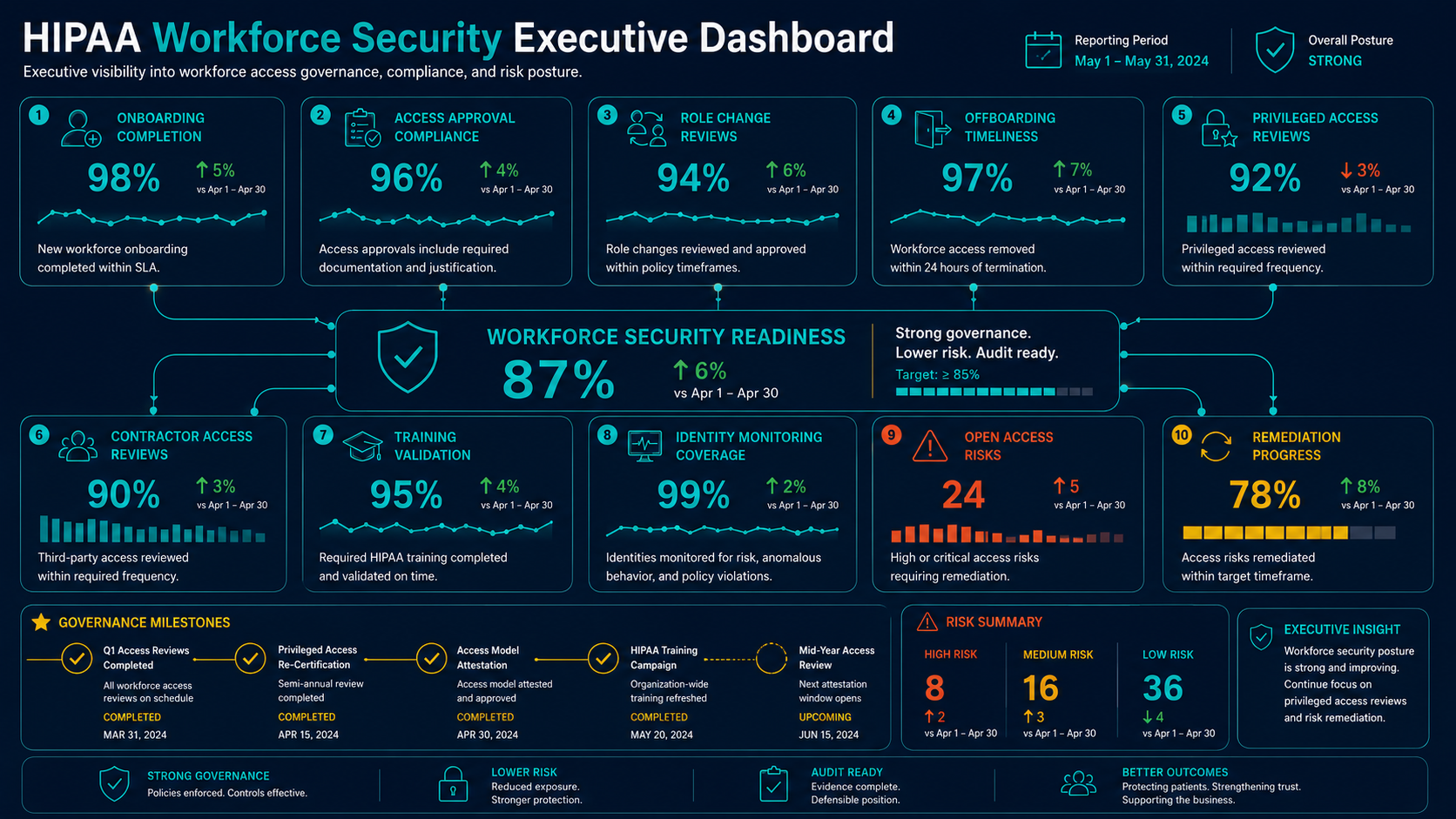
Workforce security should be visible to leadership because it affects unauthorized access risk, insider misuse, ransomware exposure, breach response, patient trust, cyber insurance, and compliance readiness. Executives do not need to manage individual permissions, but they should know whether workforce access is governed.
Useful leadership questions include:
- Do we have a documented process for authorizing workforce access to ePHI systems?
- Are access approvals tied to job roles and manager ownership?
- How quickly is access removed after termination?
- How are role changes communicated to IT and security?
- Are contractors and temporary workers reviewed on a defined cadence?
- Are privileged accounts separately approved, protected, monitored, and reviewed?
- Can we prove that users completed required training before access was granted?
- Can we produce access review and offboarding evidence during an audit?
- Are workforce access gaps tracked as remediation items?
- What workforce security metrics are reported to leadership?
How DBT Helps Healthcare Organizations
DBT helps healthcare organizations strengthen the identity, access, monitoring, and operational processes that support HIPAA workforce security readiness. We help connect workforce lifecycle events to practical access control, security monitoring, and evidence collection.
DBT can support workforce security readiness through:
- Identity and access security assessment
- Account lifecycle and offboarding process review
- MFA and passwordless authentication implementation
- Privileged access review and administrative account governance
- Managed SIEM and access monitoring
- MXDR and incident response support
- EDR and endpoint security visibility
- SASE and ZTNA access control improvements
- Contractor and vendor access review
- Security awareness and policy acknowledgement evidence support
- Executive reporting and remediation tracking
DBT does not replace legal counsel or the healthcare organization’s internal compliance ownership. We help build, operate, monitor, and document cybersecurity capabilities that support HIPAA workforce security readiness.
Related DBT Resources
For the broader governance foundation, review HIPAA Administrative Safeguards Explained. For access control details, review HIPAA Access Control Requirements Explained. For workforce training expectations, review HIPAA Security Awareness Training Requirements Explained.
Healthcare organizations evaluating authentication modernization should also review Passwordless Authentication Compliance Considerations, Phishing-Resistant MFA Explained, and DBT’s Identity & Access Security services. For operational support, review Cybersecurity Operations, Compliance & Risk Management, and Healthcare Cybersecurity Services.
Final Thoughts
HIPAA workforce security requirements are about making access to ePHI intentional, appropriate, supervised, and removable. The strongest healthcare organizations do not treat workforce access as a one-time onboarding task. They manage access across the full lifecycle.
When workforce security is implemented well, healthcare leaders gain stronger accountability, faster offboarding, better access evidence, reduced insider and credential risk, and a more defensible approach to protecting ePHI.
A practical workforce security program connects HR events, manager approvals, identity governance, access reviews, monitoring, training, vendor oversight, and executive reporting into one repeatable process.