
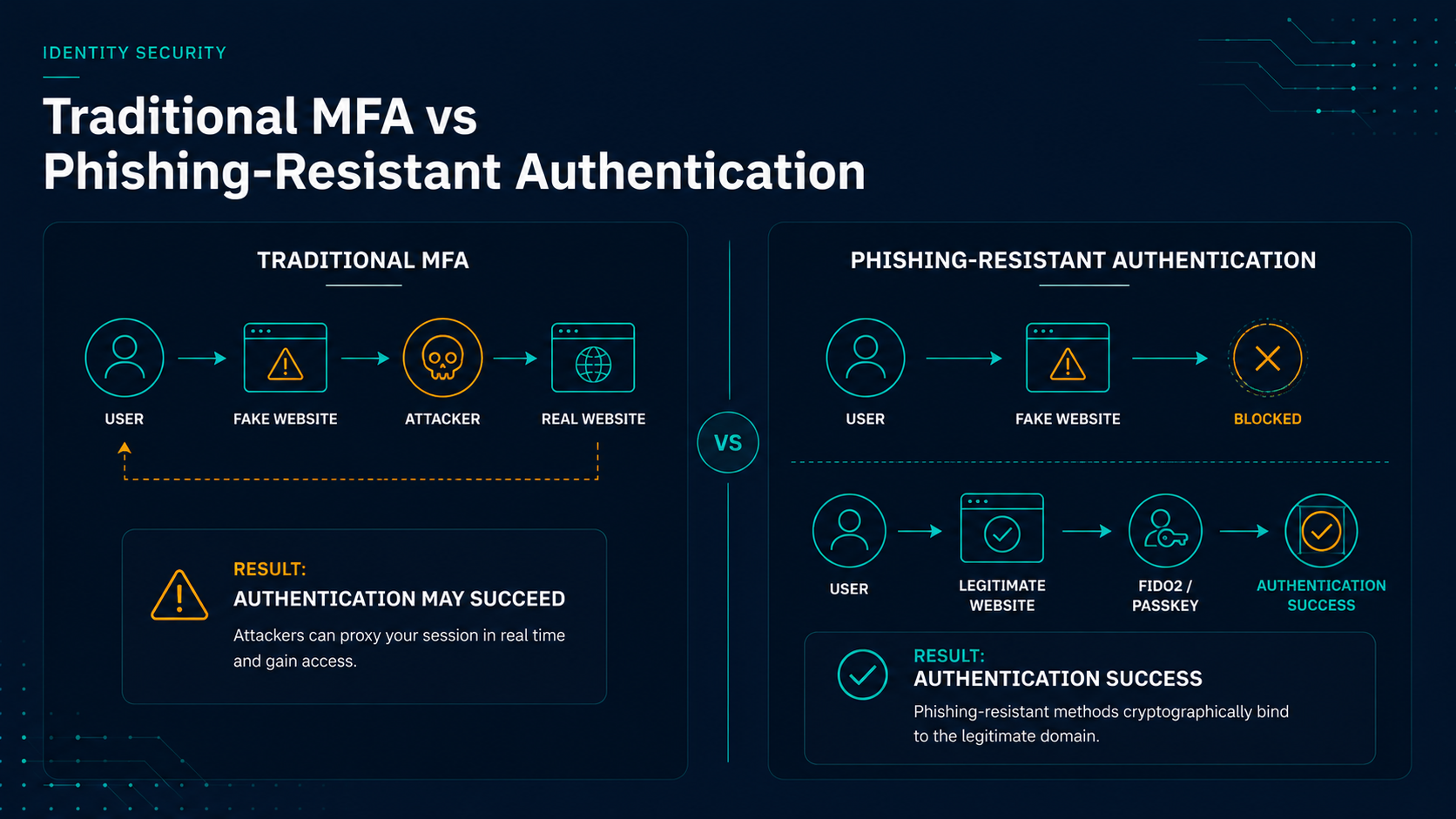
Why Phishing-Resistant MFA Matters
Multi-factor authentication (MFA) has dramatically improved security over the last decade. Unfortunately, attackers have improved as well. Today, credential phishing kits, adversary-in-the-middle attacks, session hijacking, MFA fatigue campaigns, and social engineering techniques routinely bypass traditional MFA implementations.
As a result, organizations are increasingly moving toward phishing-resistant MFA, a category of authentication methods specifically designed to prevent users from being tricked into authenticating to fraudulent websites and services.
Organizations including Microsoft, CISA, NIST, and major cyber insurance providers increasingly recommend phishing-resistant authentication as a foundational security control for privileged users and high-risk environments.
Key Takeaways
- Not all MFA methods provide the same level of protection.
- SMS codes and traditional authenticator codes can still be phished.
- Phishing-resistant MFA validates the service being accessed before authentication is completed.
- FIDO2 security keys, passkeys, and modern passwordless platforms provide the strongest protection.
- Many compliance frameworks and cyber insurance carriers increasingly expect phishing-resistant authentication for privileged accounts.
What Is Multi-Factor Authentication?
Multi-factor authentication requires users to provide multiple forms of verification before access is granted.
Authentication factors generally fall into three categories:
- Something you know — passwords, PINs, security questions.
- Something you have — mobile devices, security keys, smart cards.
- Something you are — fingerprints, facial recognition, biometrics.
Traditional MFA improves security by requiring multiple factors, but the method used to validate those factors determines how resistant the solution is to phishing attacks.
Why Traditional MFA Can Still Be Phished
Many organizations assume that enabling MFA completely solves credential theft. Unfortunately, attackers have adapted their techniques to capture MFA approvals along with passwords.
SMS One-Time Passcodes
SMS-based authentication remains common because it is easy to deploy. However, SMS codes are vulnerable to:
- SIM-swapping attacks
- SMS interception
- Real-time phishing attacks
- Social engineering
If a user enters both their password and SMS code into a fraudulent website, an attacker can often immediately use those credentials to access the legitimate service.
Authenticator App Codes (TOTP)
Authenticator applications such as Microsoft Authenticator and Google Authenticator generate rotating six-digit codes that improve security over SMS.
However, these codes can still be entered into fraudulent websites. If the attacker relays the code to the legitimate service before it expires, authentication can still succeed.
Push Notification MFA
Push-based authentication improves convenience but introduces another risk known as MFA fatigue or push bombing.
Attackers repeatedly send authentication requests until a user eventually approves one by mistake. Organizations have experienced numerous breaches due to users accepting fraudulent push requests.
What Makes MFA Phishing Resistant?
Phishing-resistant authentication removes the burden from the user. Instead of expecting the user to identify fraudulent websites, the authentication technology itself verifies the legitimacy of the service requesting authentication.
For example:
- Legitimate: login.microsoftonline.com
- Fraudulent: login-microsoft-auth.com
Traditional MFA may still allow users to enter credentials into the fraudulent website. Phishing-resistant MFA validates the actual destination and cryptographically binds the authentication process to the legitimate service.
If the request originates from a fake website, authentication fails automatically.
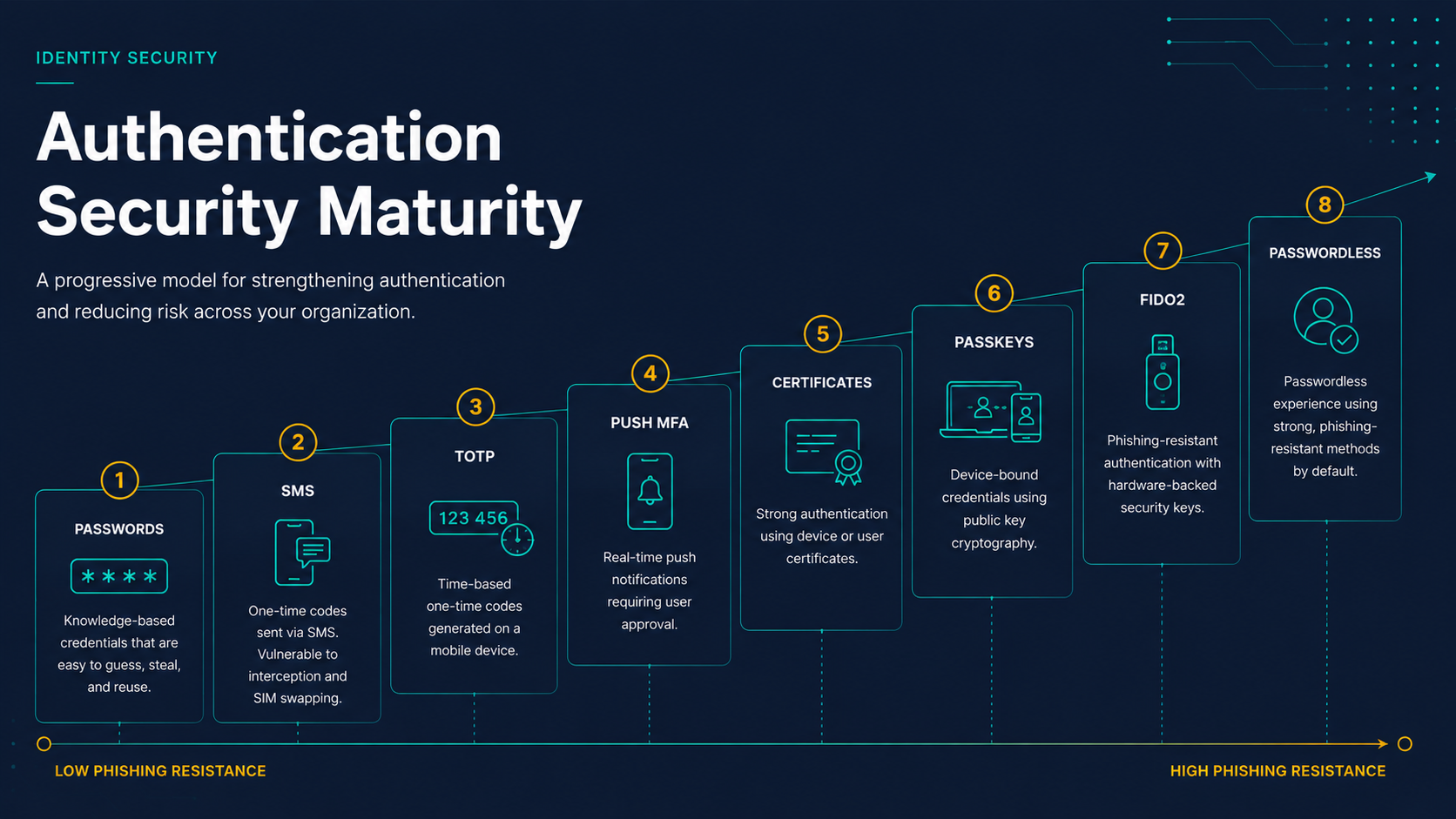
Comparing Common MFA Methods
Key Insight
The primary difference between traditional MFA and phishing-resistant MFA is not the number of authentication factors used. The difference is whether the authentication method can verify the legitimacy of the service requesting authentication before credentials are presented.
| Authentication Method | Phishing Resistant | Passwordless | User Experience |
|---|---|---|---|
| SMS Codes | No | No | Moderate |
| TOTP Authenticator Codes | No | No | Moderate |
| Push Notifications | Limited | No | Good |
| Certificate Authentication | Partial | Yes | Good |
| FIDO2 Security Keys | Yes | Yes | Excellent |
| Passkeys | Yes | Yes | Excellent |
| Passwordless Authentication Platforms | Yes | Yes | Excellent |
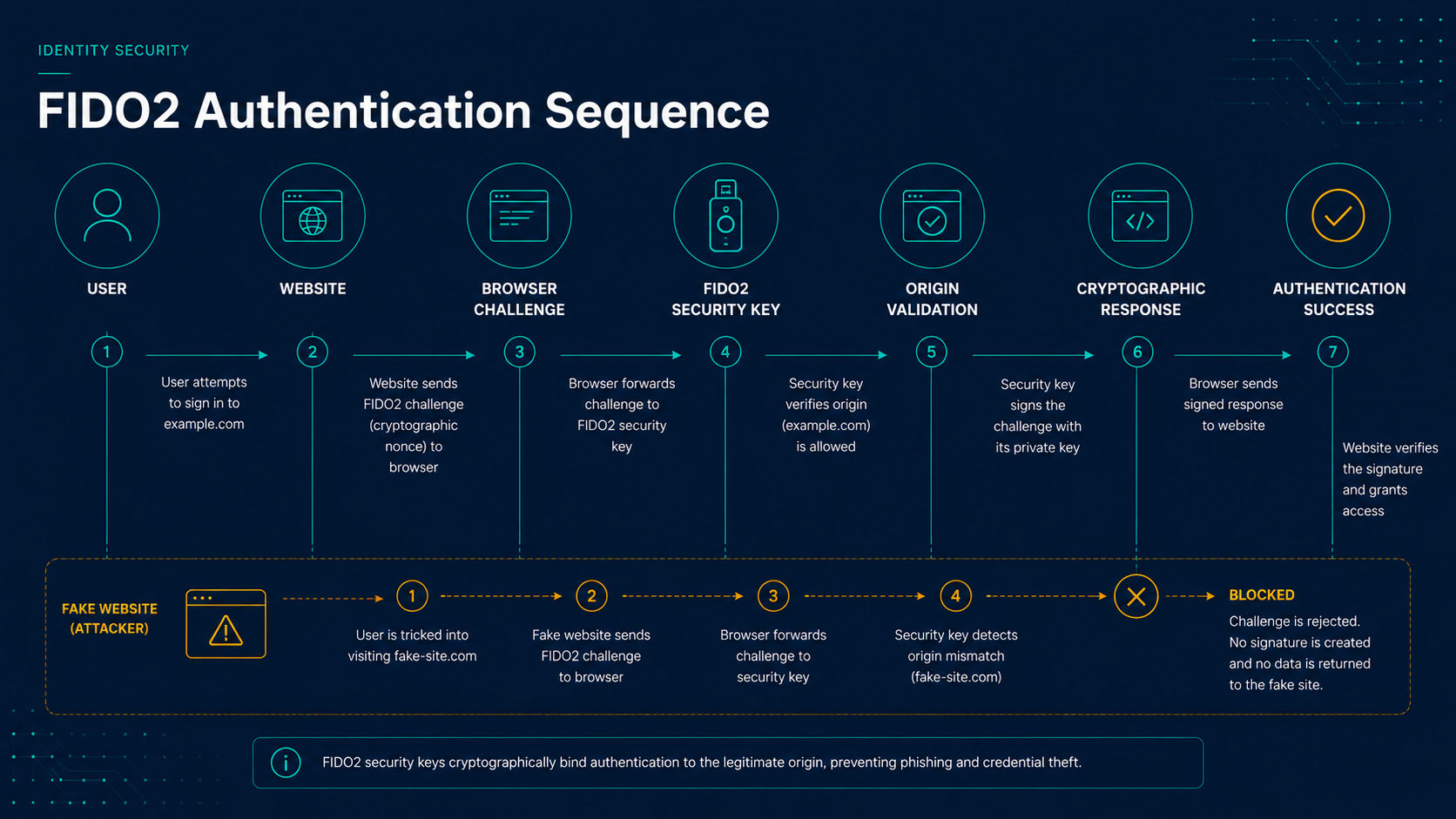
FIDO2 Security Keys
FIDO2 security keys are among the most widely adopted phishing-resistant authentication methods available today.
Popular examples include:
- YubiKey
- Feitian Security Keys
- HID Crescendo Keys
These devices use cryptographic key pairs and validate the origin of the authentication request. Even if a user visits a fraudulent website, the security key will refuse to authenticate because the origin does not match the legitimate service.
Passkeys
Passkeys represent the next evolution of passwordless authentication.
Instead of relying on passwords, passkeys use cryptographic credentials stored securely on trusted devices such as smartphones, tablets, laptops, and password managers.
Major vendors supporting passkeys include:
- Microsoft
- Apple
Passkeys provide phishing-resistant authentication while significantly improving user experience by eliminating passwords entirely.
Important Note About Passkeys
Passkeys are primarily designed for modern web applications and cloud services that support FIDO2 and WebAuthn standards.
While passkeys provide an excellent user experience for websites and SaaS platforms, they do not directly replace authentication workflows for traditional Active Directory logons, LDAP authentication, Remote Desktop Services, VPN authentication, or many legacy on-premises applications.
Organizations operating hybrid environments often require additional passwordless authentication platforms to extend phishing-resistant authentication into these legacy workflows.
Passwordless Authentication Platforms
Many organizations operate hybrid environments containing Active Directory, legacy applications, VPNs, Remote Desktop Services, workstation login requirements, and other systems that are difficult to modernize.
Passwordless authentication platforms help bridge this gap by extending phishing-resistant authentication into environments where traditional password-based workflows still exist.
For example, platforms such as Secret Double Octopus can support:
- Windows workstation login
- Remote Desktop authentication
- VPN access
- Administrative elevation prompts
- Legacy application authentication
- Hybrid Active Directory environments
Learn more in our guide on Passwordless Authentication for Active Directory.
Compliance and Regulatory Drivers
Many organizations are pursuing phishing-resistant MFA not only for security reasons but also because regulatory guidance increasingly recommends stronger authentication controls.
Common frameworks and guidance include:
- CISA Secure by Design initiatives
- NIST SP 800-63 Digital Identity Guidelines
- CMMC requirements
- HIPAA security safeguards
- Cyber insurance requirements
While requirements vary by industry, phishing-resistant authentication is becoming a common expectation for privileged users and administrative access.
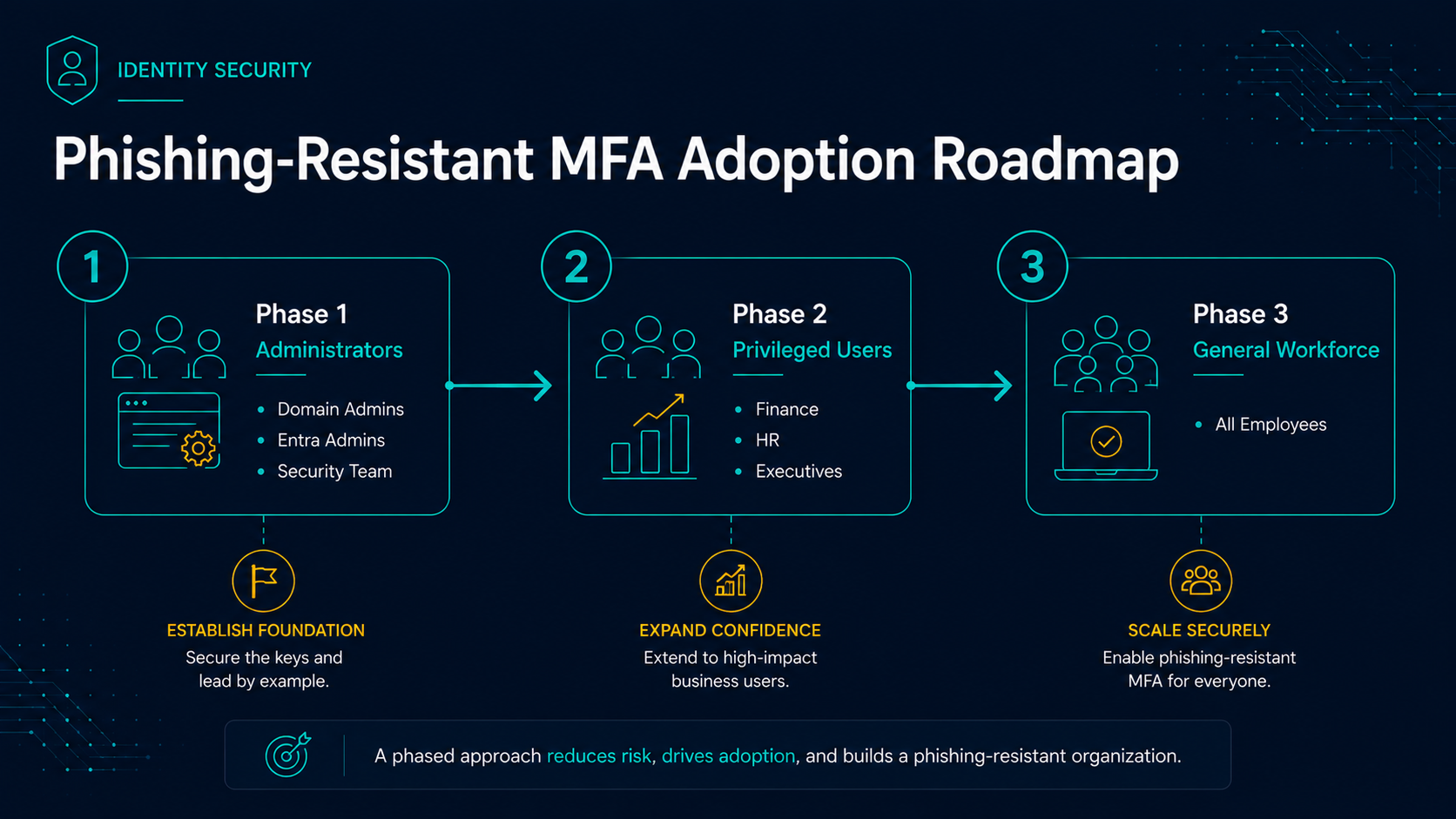
When Should Organizations Move to Phishing-Resistant MFA?
Most organizations do not need to replace every authentication workflow immediately. A phased approach is often the most successful.
-
Phase 1 – Administrative Accounts
Protect domain administrators, cloud administrators, privileged service accounts, security teams, and other high-value targets first. These accounts represent the highest risk and provide the greatest reduction in organizational exposure. -
Phase 2 – High-Risk Users
Expand phishing-resistant authentication to executives, finance personnel, HR teams, legal staff, and users who regularly access sensitive data or approve financial transactions. -
Phase 3 – General Workforce
Broaden deployment across the organization as support processes mature and applications are modernized to support phishing-resistant authentication methods.
Final Thoughts
Traditional MFA remains far better than password-only authentication, but modern threats increasingly target MFA workflows directly. Organizations seeking stronger protection against credential theft, phishing campaigns, adversary-in-the-middle attacks, and account compromise should evaluate phishing-resistant authentication strategies.
Whether through FIDO2 security keys, passkeys, passwordless authentication platforms, or a combination of technologies, phishing-resistant MFA is quickly becoming the new standard for modern identity security.