
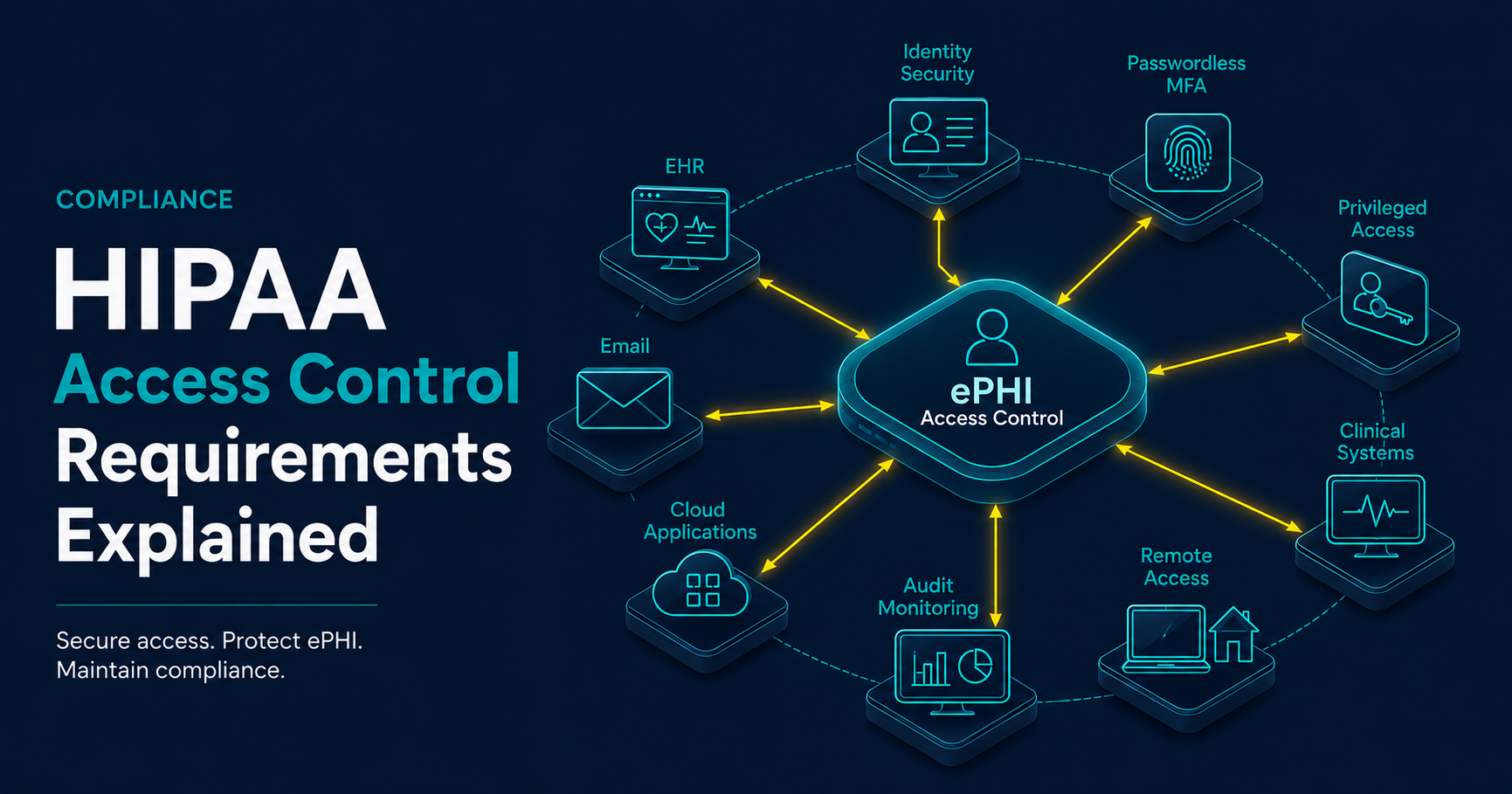
What Are HIPAA Access Control Requirements?
HIPAA access control requirements are part of the HIPAA Security Rule’s Technical Safeguards. They focus on limiting access to electronic protected health information, commonly referred to as ePHI, to authorized users and appropriate workflows.
In practical terms, access control requires healthcare organizations to understand which systems contain or provide access to ePHI, who needs access, how access is approved, how identity is verified, how privileged access is limited, how emergency access is handled, and how access activity is reviewed over time.
For healthcare leaders, access control is one of the most important bridges between compliance and cybersecurity. Weak access control can contribute to unauthorized patient record access, credential compromise, ransomware exposure, vendor misuse, business email compromise, and breach notification risk.
Key Takeaways
- HIPAA access control is about limiting ePHI access to authorized users and appropriate workflows.
- Access control should include unique user identification, emergency access procedures, automatic logoff, encryption considerations, and recurring review.
- MFA, passwordless authentication, least privilege, privileged access controls, SASE, ZTNA, and SIEM monitoring can support HIPAA readiness.
- Healthcare access control programs must cover more than the EHR, including email, cloud systems, file shares, backups, remote access, and vendor access.
- Organizations should maintain evidence showing how access is requested, approved, reviewed, monitored, and removed.
Access Control Is More Than User Accounts
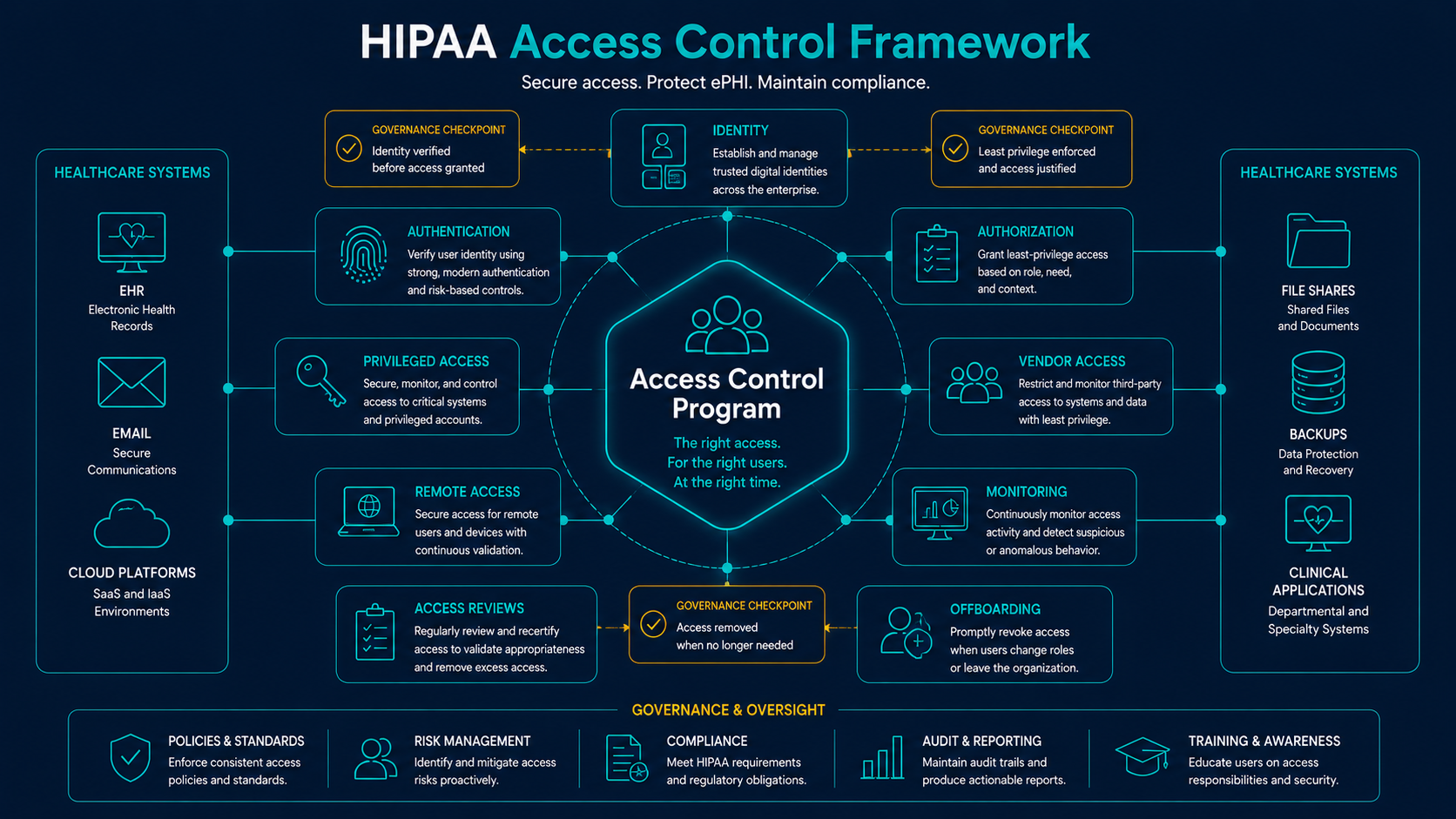
Many organizations think of access control as simply creating and disabling user accounts. HIPAA access control is broader than that. It includes the full lifecycle of access: request, approval, provisioning, authentication, authorization, monitoring, review, modification, emergency use, and removal.
A healthcare organization should apply access control across systems and workflows that create, receive, maintain, transmit, or provide access to ePHI. This often includes EHR platforms, billing systems, imaging applications, email, cloud storage, remote access tools, file shares, backup systems, security platforms, and vendor portals.
Core Access Control Implementation Areas
The HIPAA Security Rule identifies several access control implementation specifications. Some are required and some are addressable, but all should be evaluated through the organization’s risk analysis and operating environment.
| Access Control Area | Operational Purpose | Example Evidence |
|---|---|---|
| Unique User Identification | Assign named accounts so activity can be attributed to individual users | User account inventory, identity provider records, EHR user list, access review reports |
| Emergency Access Procedure | Define how authorized users access ePHI during downtime, outages, or urgent situations | Emergency access policy, break-glass account controls, access logs, review records |
| Automatic Logoff | Reduce exposure from unattended sessions and shared healthcare workstations | Session timeout settings, workstation policies, EHR configuration, exception records |
| Encryption and Decryption | Protect ePHI when appropriate based on risk, workflow, device, and transmission exposure | Encryption configuration, device protection records, transmission security procedures |
| Access Review and Monitoring | Validate access remains appropriate and detect suspicious activity | Access review reports, SIEM alerts, authentication logs, privileged access reviews |
Unique User Identification
Unique user identification is foundational because healthcare organizations need to know which individual account accessed systems containing ePHI. Shared or generic accounts make it difficult to determine who viewed, changed, exported, or transmitted patient information.
Named accounts support accountability, audit logging, incident investigation, access review, workforce security, and breach assessment. They also support stronger authentication methods such as MFA, phishing-resistant MFA, and passwordless authentication.
- Assign named accounts to workforce members and administrators.
- Limit shared accounts and document exceptions where they cannot be eliminated immediately.
- Separate privileged administrative accounts from standard user accounts.
- Maintain account inventories for systems containing or accessing ePHI.
- Review inactive, stale, temporary, and vendor accounts regularly.
- Ensure account activity is logged and correlated with identity records where possible.
Compliance Principle
If an organization cannot identify who accessed ePHI, it will struggle to investigate incidents, validate workforce access, prove control effectiveness, or support breach analysis. Unique user identification is the foundation for accountability.
Authentication, MFA, and Passwordless Access
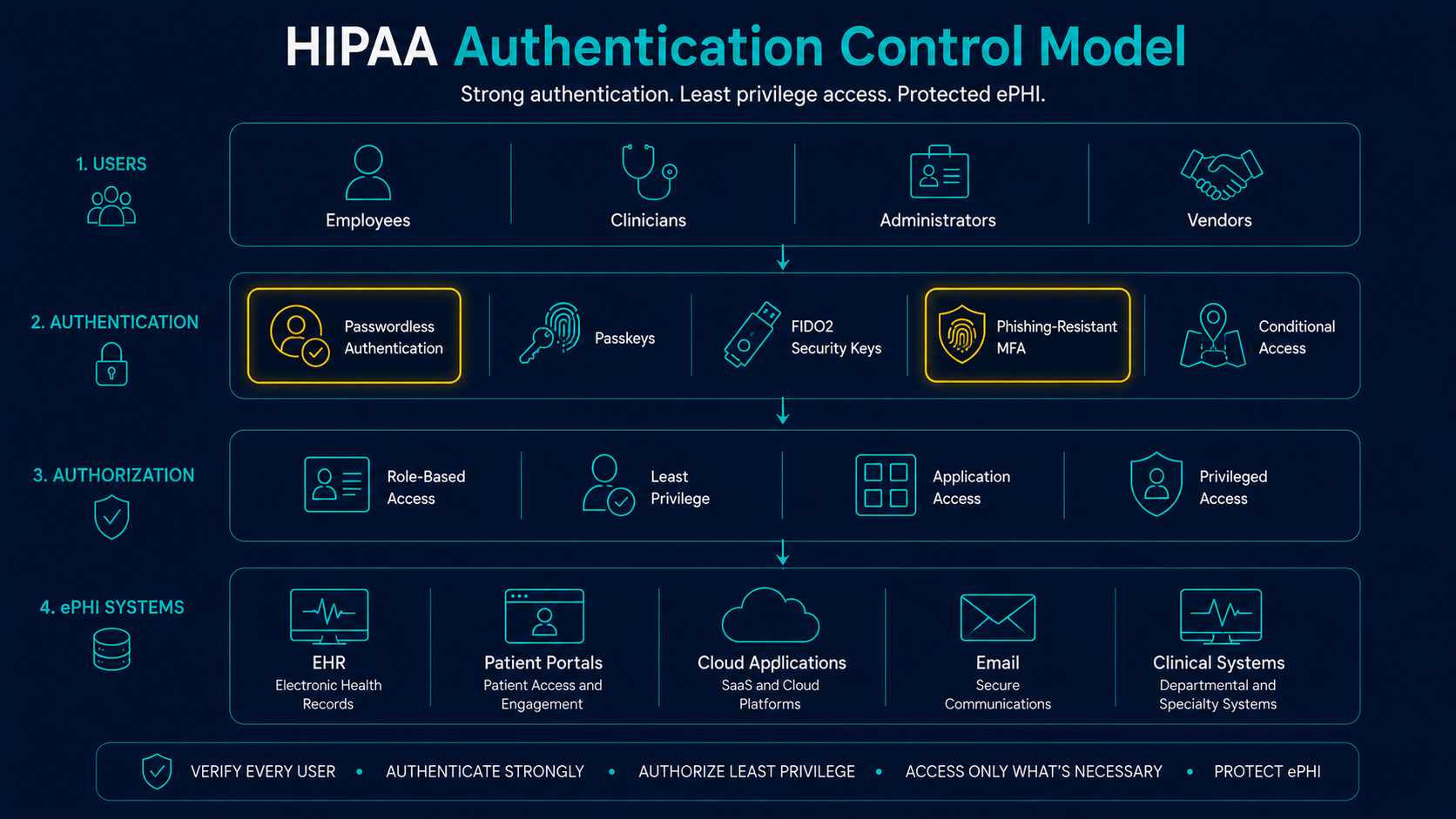
Access control depends on authentication. Healthcare organizations need reasonable assurance that users, administrators, vendors, and systems are who they claim to be before access to ePHI is granted.
Passwords alone are a weak control for many healthcare workflows. Phishing, credential reuse, password spraying, stolen sessions, and business email compromise make authentication modernization a practical security priority. MFA can reduce credential compromise risk, and passwordless or phishing-resistant authentication can further strengthen high-risk access paths.
| Access Scenario | Risk Exposure | Control Direction |
|---|---|---|
| Cloud Email and Collaboration | Account takeover can expose patient data, attachments, and sensitive communications | MFA, conditional access, mailbox monitoring, phishing-resistant authentication for high-risk users |
| Remote Access | Compromised credentials can provide external entry into healthcare systems | SASE, ZTNA, VPN hardening, MFA, device checks, access logging, geographic and risk-based policies |
| Privileged Accounts | Administrative compromise can affect many systems and large volumes of ePHI | Separate admin accounts, MFA or passwordless authentication, least privilege, session logging, recurring review |
| Vendor Access | Third-party access may be persistent, shared, or difficult to monitor | Named vendor accounts, MFA, limited access windows, approval workflows, remote access monitoring |
| Shared Clinical Workstations | Unattended sessions can expose ePHI or reduce user accountability | Automatic logoff, user switching workflows, session controls, access logging, workflow-aware authentication |
Least Privilege and Role-Based Access
Least privilege means users should receive only the access needed to perform their job responsibilities. Role-based access helps standardize permissions based on job function, department, location, application role, or workflow need.
In healthcare, access should reflect minimum necessary principles and operational reality. A billing user, nurse, physician, helpdesk technician, vendor support engineer, and system administrator should not have the same access pattern.
- Define common roles for major systems where possible.
- Map access to job responsibilities and workflow requirements.
- Require approval for access to systems containing ePHI.
- Review excessive permissions and privilege creep.
- Document exceptions and compensating controls.
- Remove access when users change roles or leave the organization.
Privileged Access Control
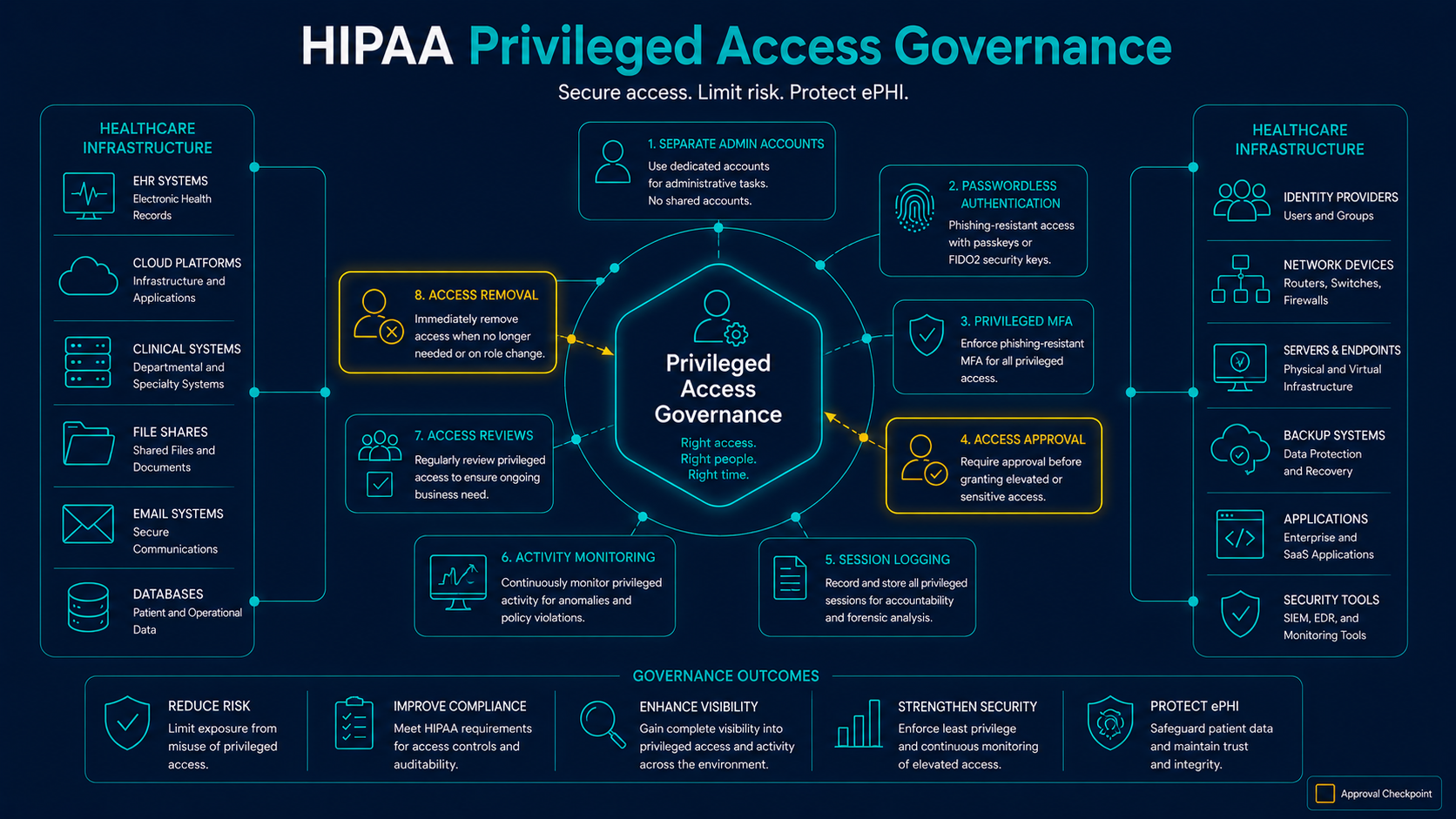
Privileged accounts present elevated risk because they can create accounts, change permissions, modify systems, disable logs, access backups, and alter security controls. Healthcare organizations should apply stronger controls to privileged access than to standard access.
Privileged access governance should include account separation, strong authentication, approval, logging, monitoring, recurring review, and rapid removal when access is no longer required.
Emergency Access Procedures
Healthcare organizations need procedures for accessing ePHI during emergencies, outages, downtime events, ransomware incidents, clinical disruptions, or other urgent situations. Emergency access should be available when needed, but it should not become an unmanaged bypass around normal controls.
A practical emergency access procedure should define when emergency access may be used, who can authorize it, which accounts or workflows are involved, how activity is logged, how access is reviewed after use, and how misuse is handled.
| Emergency Access Element | Purpose | Evidence to Maintain |
|---|---|---|
| Defined Trigger Conditions | Clarifies when emergency access is appropriate | Policy language, downtime procedure, scenario list |
| Approval and Authorization | Ensures emergency access is granted by appropriate leadership or workflow owners | Approval record, ticket, emergency access request |
| Break-Glass Controls | Provides controlled access when normal workflows are unavailable | Break-glass account inventory, MFA settings, vault records, access logs |
| Post-Use Review | Confirms access was appropriate and no misuse occurred | Audit log review, manager attestation, incident or downtime notes |
| Corrective Action | Improves access procedures after emergency use | Lessons learned, control updates, remediation tickets |
Automatic Logoff and Session Controls
Automatic logoff helps reduce the risk of unattended sessions exposing ePHI. This is especially relevant in clinical environments where shared workstations, mobile carts, exam rooms, kiosks, and remote access sessions may remain active during busy workflows.
Session controls should be configured thoughtfully. Controls that are too weak can expose ePHI, while controls that are too aggressive may disrupt patient care. The goal is to balance security, usability, workflow impact, and risk.
- Apply session timeout settings to EHR and ePHI applications.
- Use automatic lock or logoff for workstations and remote sessions.
- Review shared workstation workflows for user accountability.
- Monitor exceptions for clinical workflow needs.
- Document configuration standards and deviations.
Remote Access, SASE, and ZTNA
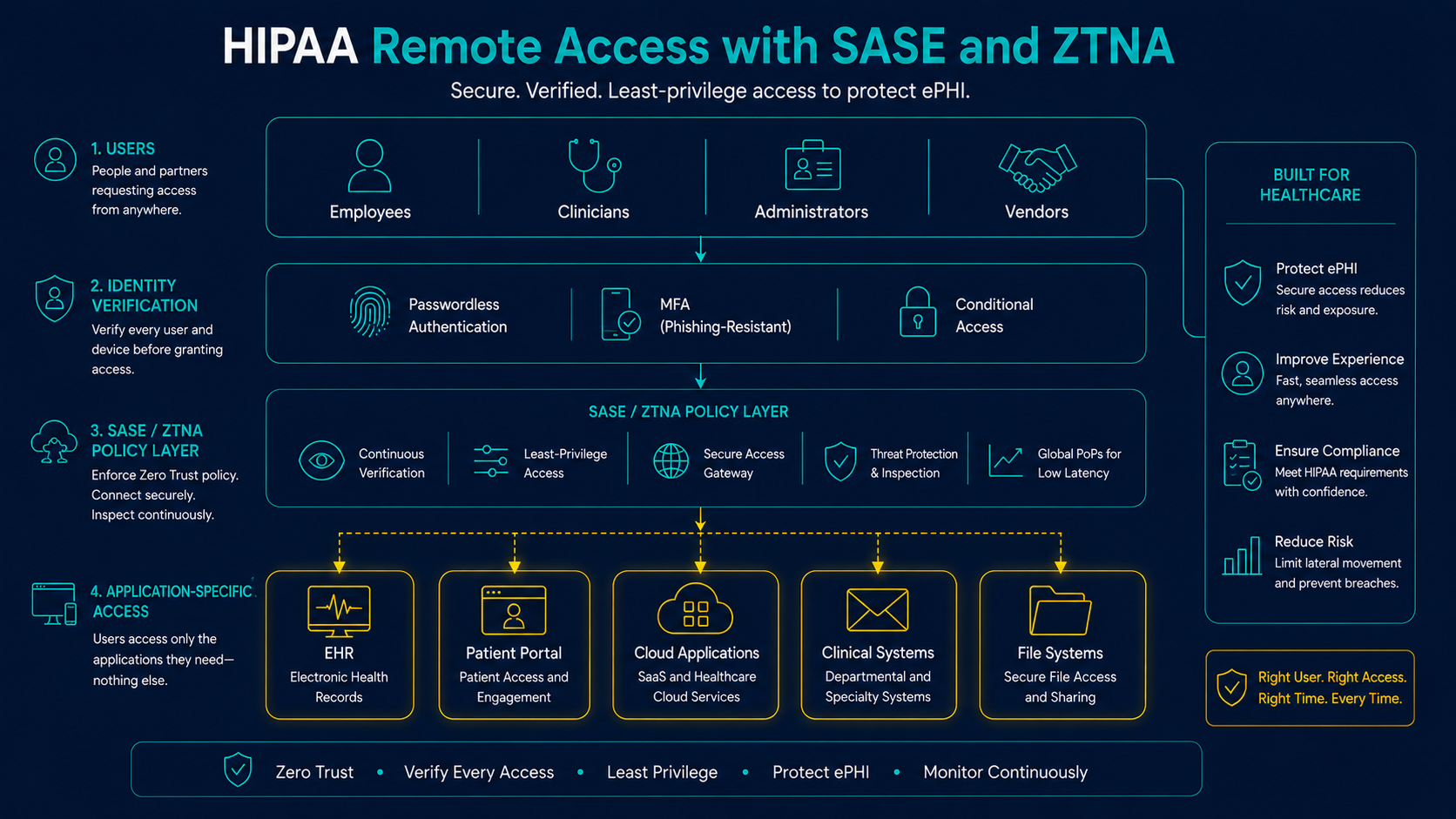
Remote access is one of the highest-risk access pathways in healthcare. Users, administrators, and vendors may access systems containing ePHI from outside the organization’s network. That access should be authenticated, authorized, monitored, and limited to appropriate applications.
SASE and ZTNA can support access control by reducing broad network access, enforcing identity-aware policy, improving remote access visibility, and limiting access to specific applications or services rather than entire network segments.
Vendor and Business Associate Access
Vendors and business associates often need access to healthcare systems for support, hosting, billing, security monitoring, backups, EHR administration, or application management. That access can create meaningful risk if it is persistent, excessive, shared, unmanaged, or poorly monitored.
Vendor access control should define who has access, what systems they can reach, whether PHI is involved, which authentication methods are required, how access is approved, how activity is monitored, and how access is removed when no longer needed.
- Maintain a list of vendors with access to systems containing or supporting ePHI.
- Use named accounts instead of shared vendor credentials where possible.
- Require MFA for vendor access.
- Limit access by role, system, time window, and business need.
- Monitor remote access and privileged vendor activity.
- Review vendor access during renewals, role changes, incidents, and offboarding.
- Confirm Business Associate Agreements and incident notification responsibilities where applicable.
Vendor Access Reminder
A Business Associate Agreement does not replace access governance. Healthcare organizations should still review vendor accounts, remote access paths, privileged access, log visibility, and offboarding evidence.
Access Logging and Monitoring
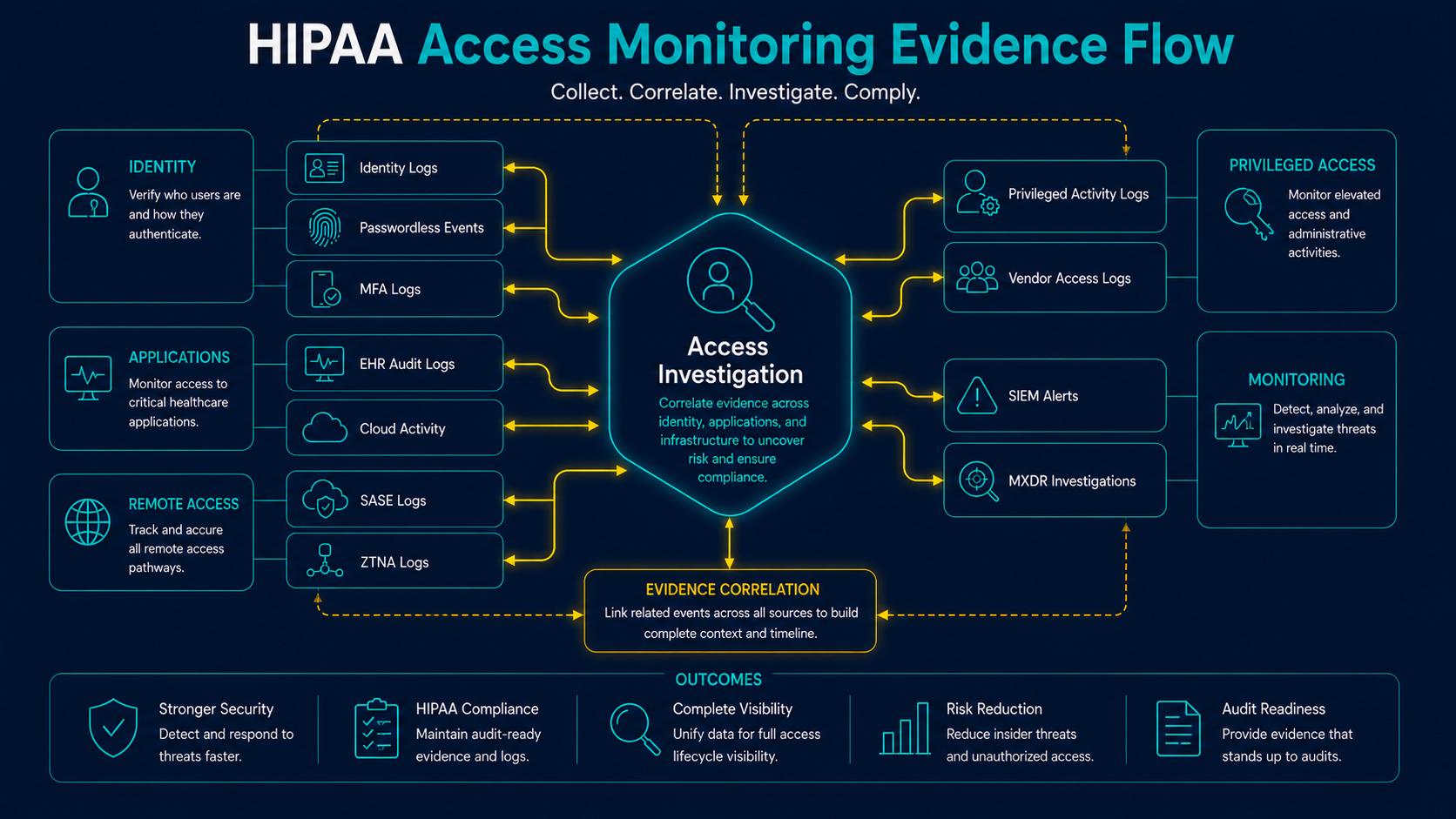
Access control depends on visibility. Healthcare organizations should be able to review authentication activity, EHR access, cloud application access, remote access sessions, privileged activity, vendor activity, and failed access attempts.
Managed SIEM, MXDR, EDR, identity logs, SASE logs, ZTNA logs, and EHR audit logs can help organizations detect suspicious access and preserve evidence for incident response or compliance review.
| Access Evidence Source | What It Helps Answer | Operational Use |
|---|---|---|
| Identity Logs | Who authenticated, from where, using what method? | Account compromise analysis, MFA validation, suspicious login review |
| EHR Audit Logs | Which patient records were accessed, modified, exported, or printed? | PHI exposure analysis, insider misuse review, affected patient analysis |
| SASE and ZTNA Logs | Which applications were accessed remotely and under what policy decision? | Remote access review, vendor access monitoring, data path validation |
| Privileged Activity Logs | Which administrative actions were performed? | Admin misuse detection, change review, security control validation |
| SIEM and MXDR Records | Was suspicious activity correlated and escalated? | Alert triage, investigation timeline, executive reporting |
Common HIPAA Access Control Failures
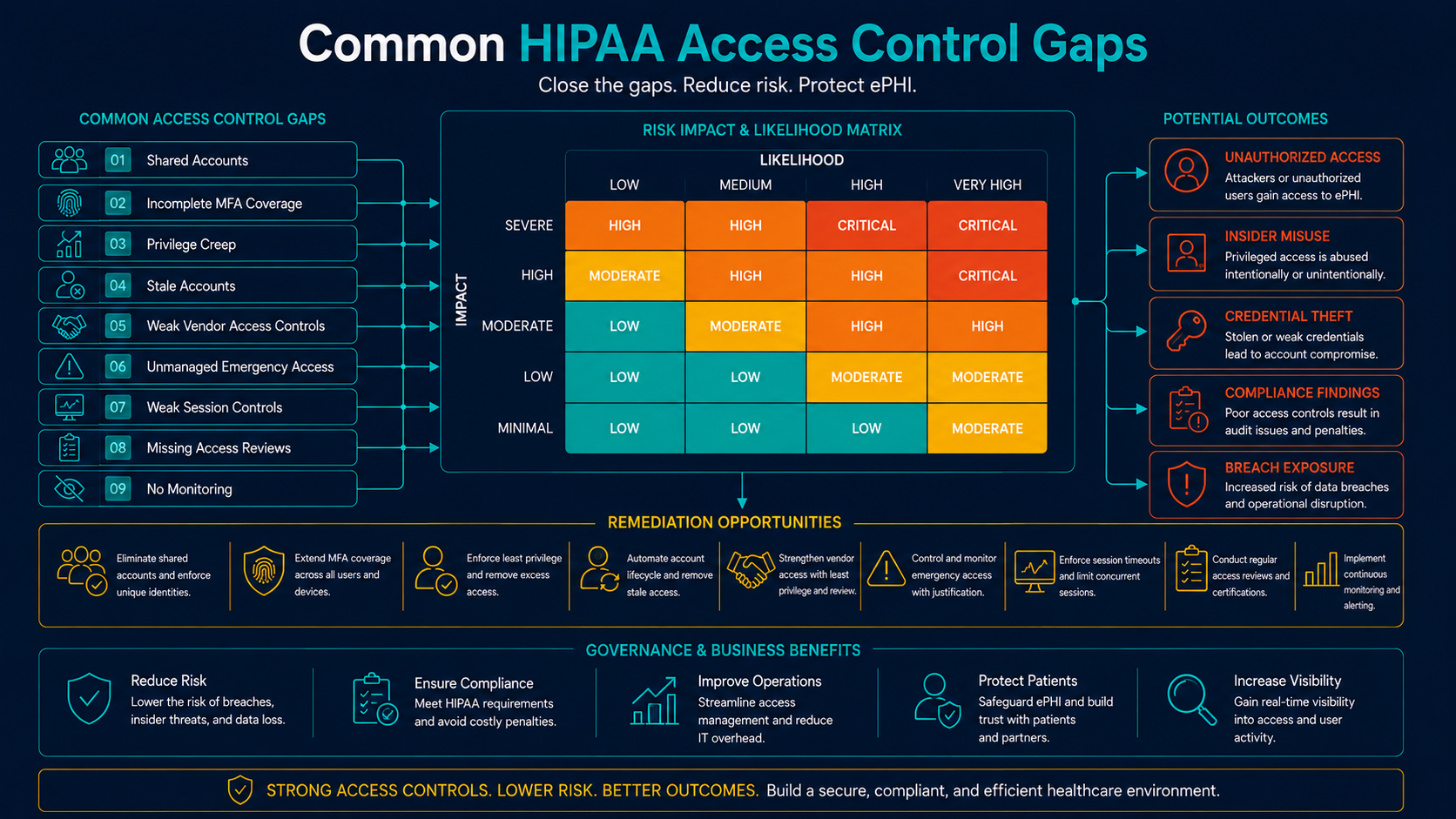
Access control failures are common because healthcare environments are complex. Many organizations operate legacy systems, shared clinical workstations, vendor portals, cloud platforms, remote access tools, and applications that were implemented at different times under different governance models.
- Shared or generic accounts: Activity cannot be attributed to an individual user.
- Incomplete MFA coverage: MFA is enforced for email but not remote access, privileged users, vendors, or legacy applications.
- Privilege creep: Users retain access after role changes or temporary assignments.
- Stale accounts: Former users, contractors, or vendors retain access after they no longer need it.
- Weak vendor access governance: Third parties have persistent access without adequate review or monitoring.
- Emergency access is unmanaged: Break-glass access exists but is not logged, reviewed, or controlled.
- Automatic logoff is inconsistent: Shared workstations and remote sessions remain active too long.
- Access reviews are informal: Managers verbally approve access but evidence is not retained.
- Logs are not reviewed: Access activity exists but is not monitored, correlated, or escalated.
How Managed Services Support HIPAA Access Control
Managed IT and managed security services can help healthcare organizations operationalize access control. The goal is not to outsource compliance responsibility, but to strengthen the identity, monitoring, endpoint, and remote access capabilities that support HIPAA readiness.
| Access Control Need | Supporting DBT Capability | Compliance-Ready Output |
|---|---|---|
| Authentication Security | MFA, passwordless authentication, phishing-resistant authentication, identity review | MFA coverage reports, authentication records, exception tracking, access policy evidence |
| Remote Access Control | SASE, ZTNA, VPN hardening, secure remote access monitoring | Remote access logs, policy reports, user activity records, vendor access evidence |
| Access Review | Account inventory, privileged access review, vendor access review, lifecycle support | Access review reports, disabled account evidence, stale account remediation records |
| Access Monitoring | Managed SIEM, MXDR, identity monitoring, EDR, alert triage | Alert records, investigation timelines, escalation tickets, executive reports |
| Endpoint and Session Protection | EDR, workstation standards, patch management, configuration review | Endpoint reports, remediation tickets, configuration evidence, incident records |
| Vendor Access Governance | Business associate access review, responsibility mapping, third-party risk documentation | Vendor access inventory, review notes, access removal evidence, responsibility matrix |
Executive and Board-Level Considerations
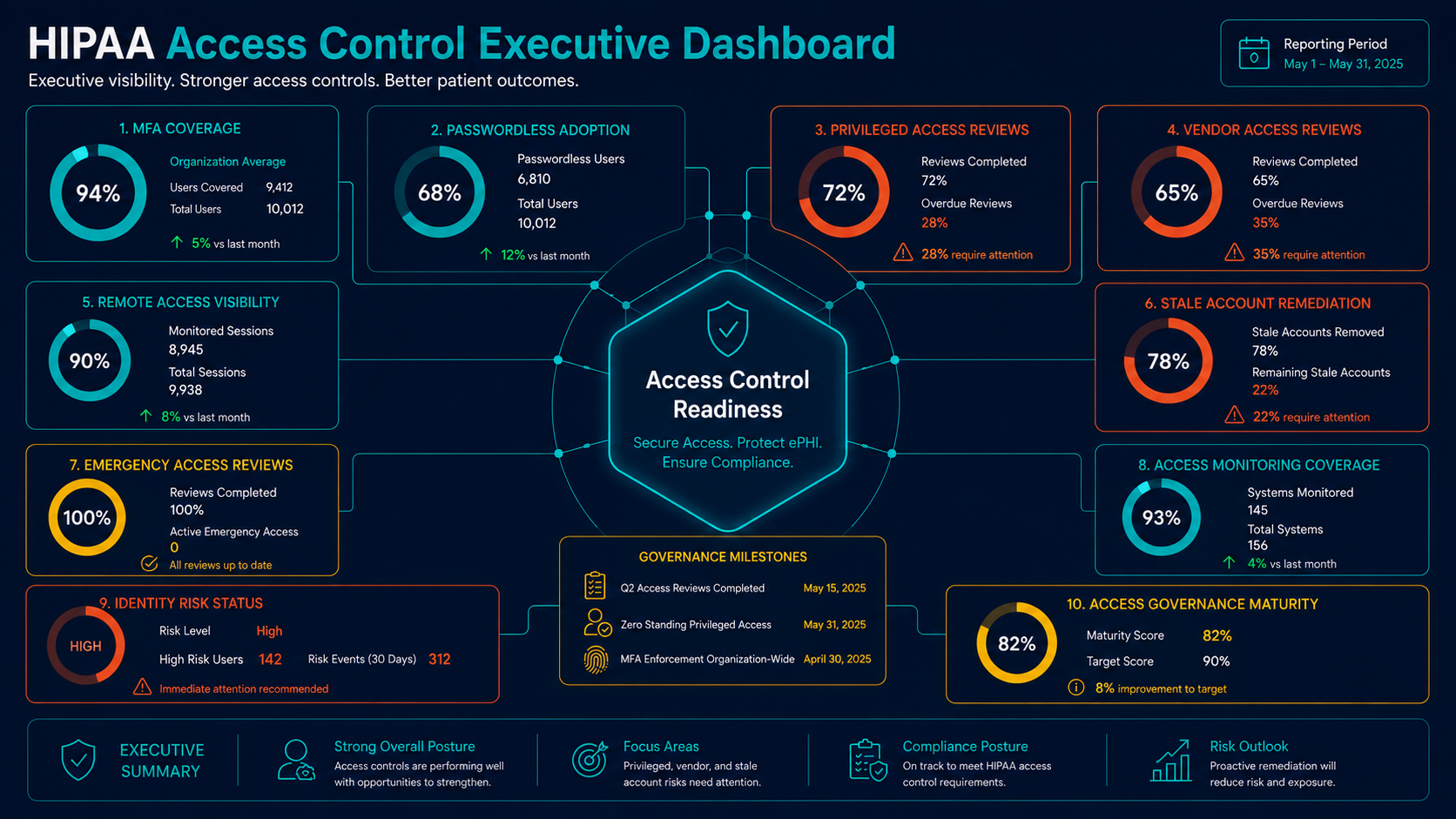
Access control should be visible to leadership because it affects breach risk, ransomware resilience, insider misuse, cyber insurance expectations, audit readiness, and patient trust. Executives do not need to manage user permissions directly, but they should know whether access is governed and whether high-risk access paths are protected.
Useful leadership questions include:
- Do we know which systems contain or provide access to ePHI?
- Are all users assigned unique accounts?
- Where is MFA required, and where are exceptions still present?
- Are remote access, vendor access, and privileged access protected by stronger controls?
- How often are access reviews performed?
- Can we quickly remove access when users or vendors leave?
- Are emergency access procedures logged and reviewed?
- Can we investigate suspicious access to patient records?
- Are access control gaps tied to remediation plans?
- What access control metrics are reported to leadership?
How DBT Helps Healthcare Organizations
DBT helps healthcare organizations strengthen the identity and access security capabilities that support HIPAA access control readiness. We help organizations improve authentication, remote access control, account lifecycle processes, monitoring, privileged access review, vendor access governance, and evidence collection.
DBT can support HIPAA access control readiness through:
- Identity and access security assessment
- MFA and passwordless authentication implementation
- Phishing-resistant authentication planning
- SASE and ZTNA access control improvements
- Privileged access review and account lifecycle support
- Managed SIEM and access monitoring
- MXDR and incident response support
- Endpoint detection and response
- Vendor access review and responsibility mapping
- Access evidence collection and executive reporting
DBT does not replace legal counsel or the healthcare organization’s internal compliance ownership. We help build, operate, monitor, and document the cybersecurity controls that support HIPAA access control readiness.
Related DBT Resources
For the broader technical safeguard context, review HIPAA Technical Safeguards Explained. For monitoring expectations, review HIPAA Audit Log Monitoring Requirements Explained. For incident response context, review HIPAA Incident Response Requirements Explained.
Healthcare organizations evaluating authentication modernization should also review Passwordless Authentication Compliance Considerations, Phishing-Resistant MFA Explained, and DBT’s Identity & Access Security services. For operational support, review Cybersecurity Operations, Compliance & Risk Management, and Healthcare Cybersecurity Services.
Final Thoughts
HIPAA access control requirements are not just a checklist of technical settings. They are an operating discipline for making sure the right users, devices, vendors, administrators, and workflows can access ePHI only when appropriate.
The strongest healthcare organizations connect access control to identity security, remote access architecture, privileged access governance, vendor oversight, audit logging, incident response, and executive reporting.
When access control is implemented well, healthcare leaders gain stronger protection against account compromise, unauthorized ePHI access, vendor misuse, ransomware exposure, and preventable compliance findings.